mirror of
https://github.com/budtmo/docker-android.git
synced 2026-07-31 04:07:25 +00:00
Compare commits
| Author | SHA1 | Date | |
|---|---|---|---|
 budtmo budtmo
|
7b6bc3fe3e | ||
|
budtmo
|
1f1d4ccf49 | ||
|
Budi UtomoandGitHub
|
8278a3f6ef | ||
|
syntxandGitHub
|
92ea480e55 | ||
|
budtmo
|
0188131350 | ||
|
budtmo
|
371a57c663 | ||
|
Budi UtomoandGitHub
|
6d4de35602 | ||
|
Joel Whitney
|
51158d8630 | ||
|
Joel Whitney
|
3a7cba3dc9 | ||
|
Joel Whitney
|
4bb9f044ed | ||
|
budtmo
|
0e35dab27f | ||
|
Budi UtomoandGitHub
|
14a98aea88 | ||
|
IreandGitHub
|
337aaf5103 | ||
|
IreandGitHub
|
f5e86d5806 | ||
|
budtmo
|
caf2cb2cd8 | ||
|
budtmo
|
03f2ea256a | ||
|
budtmo
|
af2d302bbc | ||
|
budtmo
|
b6752ea535 | ||
|
budtmo
|
06a8e83922 | ||
|
budtmo
|
a7e7eaa5aa | ||
|
budtmo
|
d2c82d05c7 | ||
|
budtmo
|
79d36e1536 | ||
|
budtmo
|
90ff1782ae | ||
|
budtmo
|
92e4933521 | ||
|
budtmo
|
4f9469db55 | ||
|
budtmo
|
cc409b9914 | ||
|
budtmo
|
4cc5a36c32 | ||
|
budtmo
|
ed77303a16 | ||
|
budtmo
|
5696fe3ea0 | ||
|
Budi UtomoandGitHub
|
b39a8784b7 | ||
|
Scott WallaceandGitHub
|
fcb1f2ec31 | ||
|
Budi UtomoandGitHub
|
49113f2cb4 | ||
|
Budi UtomoandGitHub
|
0a8b7c07a2 | ||
|
butomo1989
|
49b9c44f3a | ||
|
butomo1989
|
15cddf08c4 | ||
|
butomo1989
|
71949ee857 | ||
|
Budi UtomoandGitHub
|
d0e3c619ca | ||
|
Zhaopeng XUAN
|
8dc87a3a3c | ||
|
Budi UtomoandGitHub
|
76617374c0 | ||
|
Zhaopeng XUAN
|
70fc3b411c | ||
|
Zhaopeng XUAN
|
5e7ce8ce66 | ||
|
butomo1989
|
1d7121c41b | ||
|
butomo1989
|
0a1758091f | ||
|
Budi UtomoandGitHub
|
eb045aa644 | ||
|
Juan Ignacio Noli VillarandGitHub
|
e5a9fe7031 | ||
|
butomo1989
|
fdb464781a | ||
|
Budi UtomoandGitHub
|
2e5237ec80 | ||
|
yintro4haandGitHub
|
b1f9ec5e79 | ||
|
yintro4haandGitHub
|
1ac4a6484e | ||
|
yintro4haandGitHub
|
f09e38c92c | ||
|
butomo1989
|
e051faf84a | ||
|
butomo1989
|
2461a6e832 | ||
|
butomo1989
|
20120f5c0a | ||
|
butomo1989
|
6a0f135247 | ||
|
butomo1989
|
b36847817d | ||
|
butomo1989
|
0196d23103 | ||
|
butomo1989
|
01d1c663c1 | ||
|
butomo1989
|
5b8ef77bba | ||
|
butomo1989
|
3b3746fff3 | ||
|
butomo1989
|
d9ba33c9fa | ||
|
butomo1989
|
94132acf41 | ||
|
butomo1989
|
86e7e0f8e5 | ||
|
butomo1989
|
77a1216730 | ||
|
butomo1989
|
56e01002da | ||
|
butomo1989
|
287378162f | ||
|
butomo1989
|
8affae0fa1 | ||
|
Budi UtomoandGitHub
|
ca28b7ad10 | ||
|
Budi UtomoandGitHub
|
edebdfd380 | ||
|
Budi UtomoandGitHub
|
ddf0a451c9 | ||
|
analogue
|
fcc439b938 | ||
|
analogue
|
68ac0c42ce | ||
|
butomo1989
|
666d3eaee6 | ||
|
butomo1989
|
ecfaf236b9 | ||
|
butomo1989
|
a5714c805d | ||
|
butomo1989
|
9eb4b3c595 | ||
|
butomo1989
|
0389f64365 | ||
|
butomo1989
|
ba476eb993 | ||
|
butomo1989
|
9b2bc985e0 | ||
|
Budi UtomoandGitHub
|
1a9b9361e6 | ||
|
Budi UtomoandGitHub
|
abdb45ea0b | ||
|
butomo1989
|
b9d6237eb4 | ||
|
butomo1989
|
5936037a56 | ||
|
butomo1989
|
0460a62956 | ||
|
Aleksandr Kalashnikov
|
6403ff78be |
-29
@@ -1,29 +0,0 @@
|
||||
language: python
|
||||
|
||||
python:
|
||||
- "3.5"
|
||||
|
||||
sudo: required
|
||||
|
||||
services:
|
||||
- docker
|
||||
|
||||
install: "pip install -r requirements.txt"
|
||||
|
||||
env:
|
||||
- ANDROID_VERSION=5.0.1
|
||||
- ANDROID_VERSION=5.1.1
|
||||
- ANDROID_VERSION=6.0
|
||||
- ANDROID_VERSION=7.0
|
||||
- ANDROID_VERSION=7.1.1
|
||||
- ANDROID_VERSION=8.0
|
||||
- ANDROID_VERSION=8.1
|
||||
- ANDROID_VERSION=9.0
|
||||
- ANDROID_VERSION=10.0
|
||||
- REAL_DEVICE=True
|
||||
- GENYMOTION=True
|
||||
|
||||
script: bash travis.sh
|
||||
|
||||
after_success:
|
||||
- bash <(curl -s https://codecov.io/bash)
|
||||
+1
-1
@@ -28,7 +28,7 @@ Docker-Android's analytics are sent throughout Docker-Android's execution to Goo
|
||||
Docker-Android's analytics are accessible to Docker-Android's current maintainers. Contact [@budtmo](https://github.com/budtmo) if you are a maintainer and need access.
|
||||
|
||||
## How?
|
||||
The code is viewable in [this lines](./src/appium.sh#L225-L247).
|
||||
The code is viewable in [this script](./src/appium.sh).
|
||||
|
||||
## Opting out before starting Docker-Android
|
||||
Docker-Android analytics helps us, maintainers and leaving it on is appreciated. However, if you want to opt out and not send any information, you can do this by using passing environment variable GA=false to the Docker container.
|
||||
|
||||
@@ -4,11 +4,12 @@
|
||||
|
||||
[](https://github.com/igrigorik/ga-beacon "Analytics")
|
||||
[](https://gitter.im/budtmo/docker-android?utm_source=badge&utm_medium=badge&utm_campaign=pr-badge&utm_content=badge)
|
||||
[](https://travis-ci.org/budtmo/docker-android)
|
||||
[](https://dev.azure.com/budtmoos/budtmoos/_build/latest?definitionId=7&branchName=master)
|
||||
[](https://codecov.io/gh/budtmo/docker-android)
|
||||
[](https://www.codacy.com/app/butomo1989/docker-appium?utm_source=github.com&utm_medium=referral&utm_content=butomo1989/docker-appium&utm_campaign=Badge_Grade)
|
||||
[](https://github.com/budtmo/docker-android/releases)
|
||||
[](https://app.fossa.io/projects/git%2Bgithub.com%2Fbudtmo%2Fdocker-android?ref=badge_shield)
|
||||
[](http://paypal.me/budtmo)
|
||||
[](http://makeapullrequest.com)
|
||||
|
||||
Docker-Android is a docker image built to be used for everything related to mobile website testing and Android project.
|
||||
@@ -43,8 +44,6 @@ List of Docker images
|
||||
|
||||
|OS |Android |API |Browser |Browser version |Chromedriver |Image |Size |
|
||||
|:---|:---|:---|:---|:---|:---|:---|:---|
|
||||
|Linux|5.0.1|21|browser|37.0|2.21|budtmo/docker-android-x86-5.0.1|[](https://microbadger.com/images/budtmo/docker-android-x86-5.0.1 "Get your own image badge on microbadger.com")|
|
||||
|Linux|5.1.1|22|browser|39.0|2.13|budtmo/docker-android-x86-5.1.1|[](https://microbadger.com/images/budtmo/docker-android-x86-5.1.1 "Get your own image badge on microbadger.com")|
|
||||
|Linux|6.0|23|browser|44.0|2.18|budtmo/docker-android-x86-6.0|[](https://microbadger.com/images/budtmo/docker-android-x86-6.0 "Get your own image badge on microbadger.com")|
|
||||
|Linux|7.0|24|chrome|51.0|2.23|budtmo/docker-android-x86-7.0|[](https://microbadger.com/images/budtmo/docker-android-x86-7.0 "Get your own image badge on microbadger.com")|
|
||||
|Linux|7.1.1|25|chrome|55.0|2.28|budtmo/docker-android-x86-7.1.1|[](https://microbadger.com/images/budtmo/docker-android-x86-7.1.1 "Get your own image badge on microbadger.com")|
|
||||
@@ -52,6 +51,8 @@ List of Docker images
|
||||
|Linux|8.1|27|chrome|61.0|2.33|budtmo/docker-android-x86-8.1|[](https://microbadger.com/images/budtmo/docker-android-x86-8.1 "Get your own image badge on microbadger.com")|
|
||||
|Linux|9.0|28|chrome|66.0|2.40|budtmo/docker-android-x86-9.0|[](https://microbadger.com/images/budtmo/docker-android-x86-9.0 "Get your own image badge on microbadger.com")|
|
||||
|Linux|10.0|29|chrome|74.0|74.0.3729.6|budtmo/docker-android-x86-10.0|[](https://microbadger.com/images/budtmo/docker-android-x86-10.0 "Get your own image badge on microbadger.com")|
|
||||
|Linux|11.0|30|chrome|83.0|83.0.4103.39|budtmo/docker-android-x86-11.0|[](https://microbadger.com/images/budtmo/docker-android-x86-11.0 "Get your own image badge on microbadger.com")|
|
||||
|Linux|12.0|31|chrome|93.0|93.0.4577.15|budtmo/docker-android-x86-12.0|[](https://microbadger.com/images/budtmo/docker-android-x86-12.0 "Get your own image badge on microbadger.com")|
|
||||
|All |-|-|-|-|-|budtmo/docker-android-real-device|[](https://microbadger.com/images/budtmo/docker-android-real-device "Get your own image badge on microbadger.com")|
|
||||
|All|All|All|All|All|All|budtmo/docker-android-genymotion|[](https://microbadger.com/images/budtmo/docker-android-genymotion "Get your own image badge on microbadger.com")|
|
||||
|
||||
@@ -80,7 +81,14 @@ Docker is installed in your system.
|
||||
Quick Start
|
||||
-----------
|
||||
|
||||
1. Run Docker-Android
|
||||
1. Your machine need to support virtualization. To check it:
|
||||
|
||||
```
|
||||
sudo apt install cpu-checker
|
||||
kvm-ok
|
||||
```
|
||||
|
||||
2. Run Docker-Android
|
||||
|
||||
- For ***Linux OS***, please use image name that contains "x86"
|
||||
|
||||
@@ -91,7 +99,7 @@ Quick Start
|
||||
- For ***OSX*** and ***Windows OS***, please use Virtual Machine that support Virtualization with Ubuntu OS
|
||||
|
||||
|
||||
2. Verify the ip address of docker host.
|
||||
3. Verify the ip address of docker host.
|
||||
|
||||
- For OSX, you can find out by using following command:
|
||||
|
||||
@@ -101,12 +109,12 @@ Quick Start
|
||||
|
||||
- For different OS, localhost should work.
|
||||
|
||||
3. Open ***http://docker-host-ip-address:6080*** from web browser. Note: Adding ```?view_only=true``` will give user only view only permission.
|
||||
4. Open ***http://docker-host-ip-address:6080*** from web browser. Note: Adding ```?view_only=true``` will give user only view only permission.
|
||||
|
||||
Custom configurations
|
||||
---------------------
|
||||
|
||||
[This document](README_CUSTOM_CONFIG.md) contains custom configurations of Docker-Android that you might need, e.g. Proxy, Changing language on fly, etc.
|
||||
[This document](README_CUSTOM_CONFIG.md) contains custom configurations of Docker-Android that you might need, e.g. Proxy, Changing language on fly, etc.
|
||||
|
||||
Build Android project
|
||||
---------------------
|
||||
@@ -124,31 +132,31 @@ Docker-Android can be used for building Android project and executing its unit t
|
||||
```bash
|
||||
docker run -it --rm -v $PWD/testing-samples/ui/espresso/BasicSample:/tmp -w /tmp budtmo/docker-android-x86-8.1 /tmp/gradlew build
|
||||
```
|
||||
|
||||
|
||||
Control Android connected to host (Emulator or Real Device)
|
||||
-----------------------------------------------------------
|
||||
1. Create a docker container with this command
|
||||
1. Create a docker container with this command
|
||||
|
||||
```
|
||||
$ docker run --privileged -d -p 6080:6080 -p 5554:5554 -p 5555:5555 -p 4723:4723 --name android-container-appium budtmo/docker-android-real-device
|
||||
```
|
||||
|
||||
|
||||
2. Open noVNC [http://localhost:6080](http://localhost:6080)
|
||||
|
||||
3. Open terminal by clicking right on **noVNC** window >> **Terminal emulator**
|
||||
|
||||
4. To connect to host's adb (make sure your host have adb and connected to the device.)
|
||||
4. To connect to host's adb (make sure your host have adb and connected to the device.)
|
||||
|
||||
```
|
||||
$ adb -H host.docker.internal devices
|
||||
```
|
||||
|
||||
|
||||
To specify port, just add `-P port_number`
|
||||
|
||||
```
|
||||
$ adb -H host.docker.internal -P 5037 devices
|
||||
```
|
||||
|
||||
|
||||
5. Now your container can access your host devices. But, you need to add `remoteAdbHost` and `adbPort` desired capabilities to make **Appium** can recognise those devices.
|
||||
|
||||
|
||||
@@ -208,8 +216,7 @@ SMS Simulation
|
||||
|
||||
Google Play Services and Google Play Store
|
||||
------------------------------------------
|
||||
|
||||
Docker-Android contains Google Play Service (v12.8.74) and Google Play Store (v11.0.50). Both applications are downloaded from [apklinker](https://www.apklinker.com/), so please be aware of it in case you use private/company account to that applications.
|
||||
Not installed at this time.
|
||||
|
||||
Jenkins
|
||||
-------
|
||||
@@ -249,7 +256,22 @@ The Emulator skins are taken from [Android Studio IDE](https://developer.android
|
||||
|
||||
Security
|
||||
--------
|
||||
All docker images are protected by [Polyverse](https://polyverse.io/) by scrambling the Linux packages. For more information please read [this](https://polyverse.io/how-it-works/)
|
||||
All docker images are protected by [Polyverse](https://polyverse.io/) by scrambling the Linux packages. For more information please visit [this link](https://youtu.be/eSZNP42n-pM)
|
||||
|
||||
Monitoring
|
||||
----------
|
||||
You can use [cadvisor](https://github.com/google/cadvisor) combined with influxdb / prometheus and grafana if needed to monitor each running container.
|
||||
|
||||
Users
|
||||
-----
|
||||
Docker-Android are being used by 100+ countries around the world.
|
||||
|
||||
[](https://datastudio.google.com/s/ht7HVKHKAQE)
|
||||
|
||||
Stargazers over time
|
||||
--------------------
|
||||
|
||||
[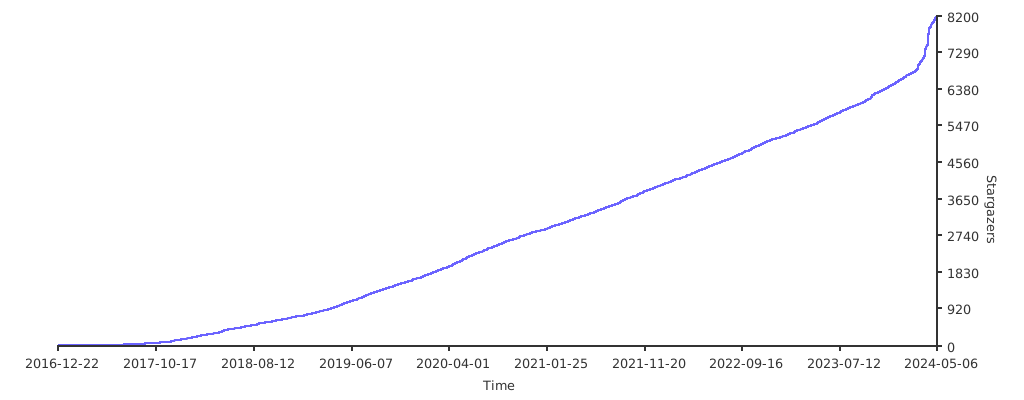](https://starchart.cc/budtmo/docker-android)
|
||||
|
||||
Special Thanks
|
||||
--------------
|
||||
|
||||
@@ -24,6 +24,8 @@ It is also possible to connect appium server that run inside docker-android with
|
||||
- APPIUM_PORT=\<port\_number>
|
||||
- SELENIUM_HOST="\<host\_ip\_address>"
|
||||
- SELENIUM_PORT=\<port\_number>
|
||||
- SELENIUM_TIMEOUT=\<timeout\_in\_seconds>
|
||||
- SELENIUM_PROXY_CLASS=\<selenium\_proxy\_class\_name>
|
||||
|
||||
To run tests for mobile browser, following parameter can be passed:
|
||||
|
||||
|
||||
@@ -13,6 +13,15 @@ You can enable proxy inside container and Android emulator by passing following
|
||||
- NO_PROXY="localhost"
|
||||
- ENABLE_PROXY_ON_EMULATOR=true
|
||||
|
||||
Proxy with authentication
|
||||
----
|
||||
|
||||
You can set proxy with authentication by passing following environment variable:
|
||||
|
||||
- HTTP_PROXY_USER="\<username>"
|
||||
- HTTP_PROXY_PASSWORD="\<password>"
|
||||
|
||||
|
||||
Language
|
||||
--------
|
||||
|
||||
@@ -77,3 +86,8 @@ docker run --privileged -d -p 6080:6080 -p 4723:4723 -p 5554:5554 -p 5555:5555 -
|
||||
```
|
||||
|
||||
For the first run, this will create a new avd and all the changes will be accessible in the `local_backup` directory. Now for all future runs, it will reuse the avds. Even this should work with new releases of `docker-android`
|
||||
|
||||
Nginx
|
||||
-----
|
||||
|
||||
Sample nginx configuration can be found [here](nginx)
|
||||
|
||||
+10
-1
@@ -38,10 +38,19 @@ The following instructions are used for OS X. You'll need [docker-machine-parall
|
||||

|
||||
|
||||
4. Enable kvm inside virtual machine
|
||||
|
||||
4.0 Check kvm version
|
||||
```bash
|
||||
# version
|
||||
$ 10.1
|
||||
```
|
||||
|
||||
Go to http://tinycorelinux.net/10.x/x86_64/tcz/ and check your kvm version, for version 10.1 is kvm-4.19.10-tinycore64.tcz
|
||||
|
||||
4.1. Run as an account other than root to install kvm packages using tce-load.
|
||||
```bash
|
||||
# su docker
|
||||
$ tce-load -wi kvm
|
||||
$ tce-load -wi kvm-4.19.10-tinycore64.tcz
|
||||
```
|
||||
|
||||
4.2. Run as root to load kvm module after kvm packages install.
|
||||
|
||||
+8
-1
@@ -1,4 +1,4 @@
|
||||
FROM appium/appium:1.17.1-p0
|
||||
FROM appium/appium:v1.22.0-p0
|
||||
|
||||
LABEL maintainer "Budi Utomo <budtmo.os@gmail.com>"
|
||||
|
||||
@@ -171,6 +171,13 @@ ADD src/.fehbg /root/.fehbg
|
||||
ADD src/rc.xml /etc/xdg/openbox/rc.xml
|
||||
RUN echo /root/.fehbg >> /etc/xdg/openbox/autostart
|
||||
|
||||
#======================
|
||||
# Workarounds
|
||||
#======================
|
||||
# Fix emulator from crashing when running as root user.
|
||||
# See https://github.com/budtmo/docker-android/issues/223
|
||||
ENV QTWEBENGINE_DISABLE_SANDBOX=1
|
||||
|
||||
#===============
|
||||
# Expose Ports
|
||||
#---------------
|
||||
|
||||
+1
-1
@@ -1,4 +1,4 @@
|
||||
FROM appium/appium:1.17.1-p0
|
||||
FROM appium/appium:v1.22.0-p0
|
||||
|
||||
LABEL maintainer "Budi Utomo <budtmo.os@gmail.com>"
|
||||
|
||||
|
||||
+1
-1
@@ -1,4 +1,4 @@
|
||||
FROM appium/appium:1.17.1-p0
|
||||
FROM appium/appium:v1.22.0-p0
|
||||
|
||||
LABEL maintainer "Budi Utomo <budtmo.os@gmail.com>"
|
||||
|
||||
|
||||

Binary file not shown.
|
After Width: | Height: | Size: 61 KiB |
@@ -0,0 +1,16 @@
|
||||
Nginx
|
||||
-----
|
||||
|
||||
You can have one page which contains the list of running containers.
|
||||
|
||||
##### Quick Start
|
||||
|
||||
1. Run 2 docker-android containers which have port 6081 and 6082
|
||||
|
||||
2. Run docker-nginx
|
||||
|
||||
```
|
||||
docker run -d --name nginx --network host -v $PWD/conf.d:/etc/nginx/conf.d nginx:1.18.0
|
||||
```
|
||||
|
||||
3. Open [http://127.0.0.1](http://127.0.0.1) from Web-Browser to see the list of running containers OR open ```http://127.0.0.1/container-1/?nginx=&path=/container-1/websockify&view_only=true&password=secr3t``` to see specific container.
|
||||
@@ -0,0 +1,11 @@
|
||||
containers = '[\
|
||||
{\
|
||||
"No": "1", \
|
||||
"Name": "Emulator 01", \
|
||||
"VNC": "http://127.0.0.1/container-1/?nginx=&path=/container-1/websockify&view_only=true"\
|
||||
}, \
|
||||
{\
|
||||
"No": "2", \
|
||||
"Name": "Emulator 02", \
|
||||
"VNC": "http://127.0.0.1/container-2/?nginx=&path=/container-2/websockify&view_only=true"\
|
||||
}]';
|
||||
Executable
+43
@@ -0,0 +1,43 @@
|
||||
server {
|
||||
listen 80;
|
||||
server_name _;
|
||||
|
||||
location / {
|
||||
root /etc/nginx/conf.d;
|
||||
index index.html;
|
||||
}
|
||||
|
||||
location /container-1/ {
|
||||
proxy_pass http://127.0.0.1:6081/;
|
||||
}
|
||||
|
||||
location /container-1/websockify {
|
||||
proxy_pass http://127.0.0.1:6081/;
|
||||
proxy_http_version 1.1;
|
||||
proxy_set_header Upgrade $http_upgrade;
|
||||
proxy_set_header Connection "upgrade";
|
||||
|
||||
# VNC connection timeout
|
||||
proxy_read_timeout 61s;
|
||||
|
||||
# Disable cache
|
||||
proxy_buffering off;
|
||||
}
|
||||
|
||||
location /container-2/ {
|
||||
proxy_pass http://127.0.0.1:6082/;
|
||||
}
|
||||
|
||||
location /container-2/websockify {
|
||||
proxy_pass http://127.0.0.1:6082/;
|
||||
proxy_http_version 1.1;
|
||||
proxy_set_header Upgrade $http_upgrade;
|
||||
proxy_set_header Connection "upgrade";
|
||||
|
||||
# VNC connection timeout
|
||||
proxy_read_timeout 61s;
|
||||
|
||||
# Disable cache
|
||||
proxy_buffering off;
|
||||
}
|
||||
}
|
||||
@@ -0,0 +1,13 @@
|
||||
<!DOCTYPE html>
|
||||
<html>
|
||||
<head>
|
||||
<meta charset="utf-8">
|
||||
<title>List of docker-android containers</title>
|
||||
<link href="styles/main.css" type="text/css" rel="stylesheet">
|
||||
</head>
|
||||
<body>
|
||||
<div id="showData"></div>
|
||||
<script type="text/javascript" src="data/data.json"></script>
|
||||
<script src="scripts/main.js" type="text/javascript"></script>
|
||||
</body>
|
||||
</html>
|
||||
@@ -0,0 +1,55 @@
|
||||
var devices = JSON.parse(containers);
|
||||
|
||||
var headers = [];
|
||||
for (var pos = 0; pos < devices.length; pos++) {
|
||||
for (var deviceKey in devices[pos]) {
|
||||
// Check if key is already added to headers
|
||||
if (headers.indexOf(deviceKey) === -1) {
|
||||
headers.push(deviceKey);
|
||||
}
|
||||
}
|
||||
}
|
||||
|
||||
// Create a table
|
||||
var table = document.createElement("table");
|
||||
|
||||
// Insert table header
|
||||
var tr = table.insertRow(-1);
|
||||
for (var pos = 0; pos < headers.length; pos++) {
|
||||
var th = document.createElement("th"); // TABLE HEADER.
|
||||
var header = headers[pos];
|
||||
th.innerHTML = header;
|
||||
tr.appendChild(th);
|
||||
}
|
||||
|
||||
// Insert table content
|
||||
for (var pos = 0; pos < devices.length; pos++) {
|
||||
tr = table.insertRow(-1);
|
||||
for (var index = 0; index < headers.length; index++) {
|
||||
var td = document.createElement("td");
|
||||
var content = devices[pos][headers[index]];
|
||||
|
||||
if (index === 1) {
|
||||
var link = document.createElement("a");
|
||||
link.href = devices[pos][headers[index+1]];
|
||||
link.innerHTML = content;
|
||||
td.appendChild(link);
|
||||
} else if (index === 2) {
|
||||
var object = document.createElement("object");
|
||||
object.type = "text/html";
|
||||
object.data = content;
|
||||
object.width = "950px";
|
||||
object.height = "950px";
|
||||
td.appendChild(object);
|
||||
} else {
|
||||
td.innerHTML = content;
|
||||
}
|
||||
|
||||
tr.appendChild(td);
|
||||
}
|
||||
}
|
||||
|
||||
// Put the table inside div
|
||||
var divContainer = document.getElementById("showData");
|
||||
divContainer.innerHTML = "";
|
||||
divContainer.appendChild(table);
|
||||
@@ -0,0 +1,13 @@
|
||||
th, td {
|
||||
font:14px Verdana;
|
||||
}
|
||||
table, th, td
|
||||
{
|
||||
border: solid 1px #DDD;
|
||||
border-collapse: collapse;
|
||||
padding: 2px 3px;
|
||||
text-align: center;
|
||||
}
|
||||
th {
|
||||
font-weight:bold;
|
||||
}
|
||||
@@ -0,0 +1,51 @@
|
||||
trigger:
|
||||
tags:
|
||||
include:
|
||||
- v*
|
||||
|
||||
jobs:
|
||||
- job: build_and_release_emulators
|
||||
pool:
|
||||
vmImage: ubuntu-20.04
|
||||
strategy:
|
||||
maxParallel: 10
|
||||
matrix:
|
||||
6.0:
|
||||
android.version: '6.0'
|
||||
7.0:
|
||||
android.version: '7.0'
|
||||
7.1.1:
|
||||
android.version: '7.1.1'
|
||||
8.0:
|
||||
android.version: '8.0'
|
||||
8.1:
|
||||
android.version: '8.1'
|
||||
9.0:
|
||||
android.version: '9.0'
|
||||
10.0:
|
||||
android.version: '10.0'
|
||||
11.0:
|
||||
android.version: '11.0'
|
||||
12.0:
|
||||
android.version: '12.0'
|
||||
steps:
|
||||
- task: UsePythonVersion@0
|
||||
inputs:
|
||||
versionSpec: '3.5'
|
||||
displayName: 'Use Python 3.5'
|
||||
|
||||
- script: |
|
||||
latest_tag=$(git describe --tags --abbrev=0)
|
||||
echo "##vso[task.setvariable variable=release_version]$latest_tag"
|
||||
|
||||
displayName: 'Get the latest release tag'
|
||||
|
||||
- script: |
|
||||
docker login -u $(DOCKER_USERNAME) -p=$(DOCKER_PASSWORD)
|
||||
TOKEN=$(polyverse_token) ./release.sh all $(android.version) $(release_version)
|
||||
docker logout
|
||||
|
||||
displayName: 'Build docker image, run unit tests and push the docker image'
|
||||
|
||||
- script: bash <(curl -s https://codecov.io/bash)
|
||||
displayName: 'Publish test result'
|
||||
@@ -0,0 +1,37 @@
|
||||
trigger:
|
||||
tags:
|
||||
include:
|
||||
- v*
|
||||
|
||||
jobs:
|
||||
- job: build_and_release_genymotion_and_device
|
||||
pool:
|
||||
vmImage: ubuntu-20.04
|
||||
strategy:
|
||||
maxParallel: 2
|
||||
matrix:
|
||||
genymotion:
|
||||
script.name: './release_real.sh'
|
||||
real_device:
|
||||
script.name: './release_geny.sh'
|
||||
steps:
|
||||
- task: UsePythonVersion@0
|
||||
inputs:
|
||||
versionSpec: '3.5'
|
||||
displayName: 'Use Python 3.5'
|
||||
|
||||
- script: |
|
||||
latest_tag=$(git describe --tags --abbrev=0)
|
||||
echo "##vso[task.setvariable variable=release_version]$latest_tag"
|
||||
|
||||
displayName: 'Get the latest release tag'
|
||||
|
||||
- script: |
|
||||
docker login -u $(DOCKER_USERNAME) -p=$(DOCKER_PASSWORD)
|
||||
TOKEN=$(p_token) $(script.name) all $(release_version)
|
||||
docker logout
|
||||
|
||||
displayName: 'Build docker image, run unit tests and push the docker image'
|
||||
|
||||
- script: bash <(curl -s https://codecov.io/bash)
|
||||
displayName: 'Publish test result'
|
||||
@@ -0,0 +1,29 @@
|
||||
trigger:
|
||||
branches:
|
||||
include:
|
||||
- master
|
||||
|
||||
pr:
|
||||
branches:
|
||||
include:
|
||||
- '*'
|
||||
|
||||
variables:
|
||||
- name: app_version
|
||||
value: test
|
||||
|
||||
jobs:
|
||||
- job: build_and_test
|
||||
pool:
|
||||
vmImage: ubuntu-20.04
|
||||
steps:
|
||||
- task: UsePythonVersion@0
|
||||
inputs:
|
||||
versionSpec: '3.5'
|
||||
displayName: 'Use Python 3.5'
|
||||
- script: pip install -r requirements.txt
|
||||
displayName: 'Install pip packages'
|
||||
- script: ./release.sh test 7.1.1 $(app_version)
|
||||
displayName: 'Build Docker image with Android 7.1.1 and run unit tests'
|
||||
- script: bash <(curl -s https://codecov.io/bash)
|
||||
displayName: 'Publish test result'
|
||||
+13
-14
@@ -10,7 +10,7 @@ else
|
||||
fi
|
||||
|
||||
if [ -z "$2" ]; then
|
||||
read -p "Android version (5.0.1|5.1.1|6.0|7.0|7.1.1|8.0|8.1|9.0|10.0|all): " ANDROID_VERSION
|
||||
read -p "Android version (6.0|7.0|7.1.1|8.0|8.1|9.0|10.0|11.0|12.0|all): " ANDROID_VERSION
|
||||
else
|
||||
ANDROID_VERSION=$2
|
||||
fi
|
||||
@@ -22,8 +22,6 @@ else
|
||||
fi
|
||||
|
||||
declare -A list_of_levels=(
|
||||
[5.0.1]=21
|
||||
[5.1.1]=22
|
||||
[6.0]=23
|
||||
[7.0]=24
|
||||
[7.1.1]=25
|
||||
@@ -31,13 +29,13 @@ declare -A list_of_levels=(
|
||||
[8.1]=27
|
||||
[9.0]=28
|
||||
[10.0]=29
|
||||
[11.0]=30
|
||||
[12.0]=31
|
||||
)
|
||||
|
||||
# The version of the Chrome browser installed on the Android emulator needs to be known beforehand
|
||||
# in order to chose the proper version of chromedriver (see http://chromedriver.chromium.org/downloads)
|
||||
declare -A chromedriver_versions=(
|
||||
[5.0.1]="2.21"
|
||||
[5.1.1]="2.13"
|
||||
[6.0]="2.18"
|
||||
[7.0]="2.23"
|
||||
[7.1.1]="2.28"
|
||||
@@ -45,6 +43,8 @@ declare -A chromedriver_versions=(
|
||||
[8.1]="2.33"
|
||||
[9.0]="2.40"
|
||||
[10.0]="74.0.3729.6"
|
||||
[11.0]="83.0.4103.39"
|
||||
[12.0]="93.0.4577.15"
|
||||
)
|
||||
|
||||
function get_android_versions() {
|
||||
@@ -64,7 +64,7 @@ function get_android_versions() {
|
||||
|
||||
# If version cannot be found in the list
|
||||
if [ -z "$versions" ]; then
|
||||
echo "Android version \"$ANDROID_VERSION\" is not found in the list or not supported! Support only version 5.0.1, 5.1.1, 6.0, 7.0, 7.1.1, 8.0, 8.1"
|
||||
echo "Android version \"$ANDROID_VERSION\" is not found in the list or not supported! Support only version 6.0, 7.0, 7.1.1, 8.0, 8.1, 9.0, 10.0, 11.0, 12.0"
|
||||
exit 1
|
||||
fi
|
||||
|
||||
@@ -139,27 +139,26 @@ function build() {
|
||||
FILE_NAME=docker/Emulator_x86
|
||||
|
||||
for v in "${versions[@]}"; do
|
||||
level=${list_of_levels[$v]}
|
||||
|
||||
# Find image type and default web browser
|
||||
if [ "$v" == "5.0.1" ] || [ "$v" == "5.1.1" ]; then
|
||||
IMG_TYPE=default
|
||||
BROWSER=browser
|
||||
elif [ "$v" == "6.0" ]; then
|
||||
if [ "$v" == "6.0" ]; then
|
||||
# It is because there is no ARM EABI v7a System Image for 6.0
|
||||
IMG_TYPE=google_apis
|
||||
BROWSER=browser
|
||||
elif [ "$v" == "" ]; then
|
||||
IMG_TYPE=google_apis
|
||||
BROWSER=chrome
|
||||
BROWSER=chrome
|
||||
else
|
||||
#adb root cannot be run in IMG_TYPE=google_apis_playstore
|
||||
#adb root cannot be run in IMG_TYPE=google_apis_playstore
|
||||
IMG_TYPE=google_apis
|
||||
BROWSER=chrome
|
||||
if [ "$v" == "9.0" ]; then
|
||||
# Google dropped 32-bit support at Android 12
|
||||
if [ "$v" == "9.0" ] || [ $level -ge 31 ]; then
|
||||
processor=x86_64
|
||||
fi
|
||||
fi
|
||||
echo "[BUILD] IMAGE TYPE: $IMG_TYPE"
|
||||
level=${list_of_levels[$v]}
|
||||
echo "[BUILD] API Level: $level"
|
||||
sys_img=$processor
|
||||
echo "[BUILD] System Image: $sys_img"
|
||||
|
||||
@@ -1,29 +0,0 @@
|
||||
#!/bin/bash
|
||||
|
||||
IMAGE_NAME="budtmo/docker-android"
|
||||
|
||||
if [ -z "$1" ]; then
|
||||
read -p "Type : " TYPE
|
||||
else
|
||||
TYPE=$1
|
||||
fi
|
||||
|
||||
if [ -z "$2" ]; then
|
||||
read -p "Version : " VERSION
|
||||
else
|
||||
VERSION=$2
|
||||
fi
|
||||
|
||||
declare -a versions=("7.1.1" "7.0" "6.0" "5.1.1" "5.0.1")
|
||||
|
||||
## now loop through the above array
|
||||
for v in "${versions[@]}"
|
||||
do
|
||||
IMAGE="$IMAGE_NAME-$TYPE-$v"
|
||||
IMAGE_OLD="$IMAGE:$VERSION"
|
||||
IMAGE_LATEST="$IMAGE:latest"
|
||||
echo "Revert image \"$IMAGE_LATEST\" to version \"$IMAGE_OLD\""
|
||||
docker pull $IMAGE_OLD
|
||||
docker tag $IMAGE_OLD $IMAGE_LATEST
|
||||
docker push $IMAGE_LATEST
|
||||
done
|
||||
+12
-6
@@ -3,6 +3,7 @@
|
||||
import json
|
||||
import logging
|
||||
import os
|
||||
import re
|
||||
import subprocess
|
||||
import uuid
|
||||
|
||||
@@ -56,7 +57,7 @@ def is_initialized(device_name) -> bool:
|
||||
if os.path.exists(config_path):
|
||||
logger.info('Found existing config file at {}.'.format(config_path))
|
||||
with open(config_path, 'r') as f:
|
||||
if any('hw.device.name={}'.format(device_name) in line for line in f):
|
||||
if any(re.match(r'hw\.device\.name ?= ?{}'.format(device_name), line) for line in f):
|
||||
logger.info('Existing config file references {}. Assuming device was previously initialized.'.format(device_name))
|
||||
return True
|
||||
else:
|
||||
@@ -148,8 +149,11 @@ def appium_run(avd_name: str):
|
||||
appium_port = int(os.getenv('APPIUM_PORT', 4723))
|
||||
selenium_host = os.getenv('SELENIUM_HOST', '172.17.0.1')
|
||||
selenium_port = int(os.getenv('SELENIUM_PORT', 4444))
|
||||
selenium_timeout = int(os.getenv('SELENIUM_TIMEOUT', 30))
|
||||
selenium_proxy_class = os.getenv('SELENIUM_PROXY_CLASS', 'org.openqa.grid.selenium.proxy.DefaultRemoteProxy')
|
||||
browser_name = default_web_browser if mobile_web_test else 'android'
|
||||
create_node_config(avd_name, browser_name, appium_host, appium_port, selenium_host, selenium_port)
|
||||
create_node_config(avd_name, browser_name, appium_host, appium_port, selenium_host, selenium_port,
|
||||
selenium_timeout, selenium_proxy_class)
|
||||
cmd += ' --nodeconfig {file}'.format(file=CONFIG_FILE)
|
||||
except ValueError as v_err:
|
||||
logger.error(v_err)
|
||||
@@ -158,7 +162,7 @@ def appium_run(avd_name: str):
|
||||
|
||||
|
||||
def create_node_config(avd_name: str, browser_name: str, appium_host: str, appium_port: int, selenium_host: str,
|
||||
selenium_port: int):
|
||||
selenium_port: int, selenium_timeout: int, selenium_proxy_class: str):
|
||||
"""
|
||||
Create custom node config file in json format to be able to connect with selenium server.
|
||||
|
||||
@@ -167,6 +171,8 @@ def create_node_config(avd_name: str, browser_name: str, appium_host: str, appiu
|
||||
:param appium_port: Port number where where appium server is running
|
||||
:param selenium_host: Host where selenium server is running
|
||||
:param selenium_port: Port number where selenium server is running
|
||||
:param selenium_timeout: Selenium session timeout in seconds
|
||||
:param selenium_proxy_class: Selenium Proxy class created in Selenium hub
|
||||
"""
|
||||
config = {
|
||||
'capabilities': [
|
||||
@@ -181,12 +187,12 @@ def create_node_config(avd_name: str, browser_name: str, appium_host: str, appiu
|
||||
],
|
||||
'configuration': {
|
||||
'cleanUpCycle': 2000,
|
||||
'timeout': 30,
|
||||
'proxy': 'org.openqa.grid.selenium.proxy.DefaultRemoteProxy',
|
||||
'timeout': selenium_timeout,
|
||||
'proxy': selenium_proxy_class,
|
||||
'url': 'http://{host}:{port}/wd/hub'.format(host=appium_host, port=appium_port),
|
||||
'host': appium_host,
|
||||
'port': appium_port,
|
||||
'maxSession': 6,
|
||||
'maxSession': 1,
|
||||
'register': True,
|
||||
'registerCycle': 5000,
|
||||
'hubHost': selenium_host,
|
||||
|
||||
@@ -58,7 +58,8 @@ class TestAppium(TestCase):
|
||||
def test_config_creation(self):
|
||||
from src import CONFIG_FILE
|
||||
self.assertFalse(os.path.exists(CONFIG_FILE))
|
||||
app.create_node_config('test', 'android', '127.0.0.1', 4723, '127.0.0.1', 4444)
|
||||
app.create_node_config('test', 'android', '127.0.0.1', 4723, '127.0.0.1', 4444, 30,
|
||||
'org.openqa.grid.selenium.proxy.DefaultRemoteProxy')
|
||||
self.assertTrue(os.path.exists(CONFIG_FILE))
|
||||
os.remove(CONFIG_FILE)
|
||||
|
||||
|
||||
+18
-11
@@ -31,13 +31,6 @@ function install_google_play () {
|
||||
adb install -r "/root/google_play_store.apk"
|
||||
}
|
||||
|
||||
function disable_animation () {
|
||||
# To improve performance
|
||||
adb shell "settings put global window_animation_scale 0.0"
|
||||
adb shell "settings put global transition_animation_scale 0.0"
|
||||
adb shell "settings put global animator_duration_scale 0.0"
|
||||
}
|
||||
|
||||
function enable_proxy_if_needed () {
|
||||
if [ "$ENABLE_PROXY_ON_EMULATOR" = true ]; then
|
||||
if [ ! -z "${HTTP_PROXY// }" ]; then
|
||||
@@ -56,9 +49,24 @@ function enable_proxy_if_needed () {
|
||||
adb root
|
||||
|
||||
echo "Set up the Proxy"
|
||||
adb shell "content update --uri content://telephony/carriers --bind proxy:s:"0.0.0.0" --bind port:s:"0000" --where "mcc=310" --where "mnc=260""
|
||||
sleep 5
|
||||
adb shell "content update --uri content://telephony/carriers --bind proxy:s:"${p[0]}" --bind port:s:"${p[1]}" --where "mcc=310" --where "mnc=260""
|
||||
|
||||
|
||||
if [ ! -z "${HTTP_PROXY_USER}" ]; then
|
||||
sleep 2
|
||||
adb shell "content update --uri content://telephony/carriers --bind user:s:"${HTTP_PROXY_USER}" --where "mcc=310" --where "mnc=260""
|
||||
fi
|
||||
if [ ! -z "${HTTP_PROXY_PASSWORD}" ]; then
|
||||
sleep 2
|
||||
adb shell "content update --uri content://telephony/carriers --bind password:s:"${HTTP_PROXY_PASSWORD}" --where "mcc=310" --where "mnc=260""
|
||||
fi
|
||||
|
||||
adb unroot
|
||||
|
||||
# Mobile data need to be restarted for Android 10 or higher
|
||||
adb shell svc data disable
|
||||
adb shell svc data enable
|
||||
else
|
||||
echo "Please use http:// in the beginning!"
|
||||
fi
|
||||
@@ -69,9 +77,8 @@ function enable_proxy_if_needed () {
|
||||
fi
|
||||
}
|
||||
|
||||
enable_proxy_if_needed
|
||||
sleep 1
|
||||
change_language_if_needed
|
||||
sleep 1
|
||||
enable_proxy_if_needed
|
||||
sleep 1
|
||||
install_google_play
|
||||
disable_animation
|
||||
|
||||
@@ -1,22 +0,0 @@
|
||||
#!/bin/bash
|
||||
# Bash version should >= 4 to be able to run this script.
|
||||
|
||||
if [ -z "$TRAVIS_TAG" ]; then
|
||||
echo "UNIT TEST ONLY"
|
||||
bash release.sh test all all 0.1
|
||||
else
|
||||
if [ ! -z "$ANDROID_VERSION" ]; then
|
||||
echo "Log in to docker hub"
|
||||
docker login -u="$DOCKER_USERNAME" -p="$DOCKER_PASSWORD"
|
||||
echo "[Version: $ANDROID_VERSION] RUN UNIT TEST, BUILD DOCKER IMAGES AND PUSH THOSE TO DOCKER HUB"
|
||||
bash release.sh all $ANDROID_VERSION $TRAVIS_TAG
|
||||
elif [ ! -z "$REAL_DEVICE" ]; then
|
||||
echo "[SUPPORT FOR REAL DEVICE: BUILD DOCKER IMAGES AND PUSH THOSE TO DOCKER HUB ]"
|
||||
bash release_real.sh all $TRAVIS_TAG
|
||||
elif [ ! -z "$GENYMOTION" ]; then
|
||||
echo "[SUPPORT FOR GENYMOTION: BUILD DOCKER IMAGES AND PUSH THOSE TO DOCKER HUB ]"
|
||||
bash release_genymotion.sh all $TRAVIS_TAG
|
||||
fi
|
||||
echo "Log out of docker hub"
|
||||
docker logout
|
||||
fi
|
||||
Reference in New Issue
Block a user