mirror of
https://github.com/budtmo/docker-android.git
synced 2026-07-31 04:07:25 +00:00
Compare commits
| Author | SHA1 | Date | |
|---|---|---|---|
 butomo1989 butomo1989
|
49b9c44f3a | ||
|
butomo1989
|
15cddf08c4 | ||
|
butomo1989
|
71949ee857 | ||
|
Budi UtomoandGitHub
|
d0e3c619ca | ||
|
Zhaopeng XUAN
|
8dc87a3a3c | ||
|
Budi UtomoandGitHub
|
76617374c0 | ||
|
Zhaopeng XUAN
|
70fc3b411c | ||
|
Zhaopeng XUAN
|
5e7ce8ce66 | ||
|
butomo1989
|
1d7121c41b | ||
|
butomo1989
|
0a1758091f | ||
|
Budi UtomoandGitHub
|
eb045aa644 | ||
|
Juan Ignacio Noli VillarandGitHub
|
e5a9fe7031 | ||
|
butomo1989
|
fdb464781a | ||
|
Budi UtomoandGitHub
|
2e5237ec80 | ||
|
yintro4haandGitHub
|
b1f9ec5e79 | ||
|
yintro4haandGitHub
|
1ac4a6484e | ||
|
yintro4haandGitHub
|
f09e38c92c | ||
|
butomo1989
|
e051faf84a | ||
|
butomo1989
|
2461a6e832 | ||
|
butomo1989
|
20120f5c0a | ||
|
butomo1989
|
6a0f135247 | ||
|
butomo1989
|
b36847817d | ||
|
butomo1989
|
0196d23103 | ||
|
butomo1989
|
01d1c663c1 | ||
|
butomo1989
|
5b8ef77bba | ||
|
butomo1989
|
3b3746fff3 | ||
|
butomo1989
|
d9ba33c9fa | ||
|
butomo1989
|
94132acf41 | ||
|
butomo1989
|
86e7e0f8e5 | ||
|
butomo1989
|
77a1216730 | ||
|
butomo1989
|
56e01002da | ||
|
butomo1989
|
287378162f | ||
|
butomo1989
|
8affae0fa1 | ||
|
Budi UtomoandGitHub
|
ca28b7ad10 | ||
|
Budi UtomoandGitHub
|
edebdfd380 | ||
|
Budi UtomoandGitHub
|
ddf0a451c9 | ||
|
analogue
|
fcc439b938 | ||
|
analogue
|
68ac0c42ce | ||
|
butomo1989
|
666d3eaee6 | ||
|
butomo1989
|
ecfaf236b9 | ||
|
butomo1989
|
a5714c805d | ||
|
butomo1989
|
9eb4b3c595 | ||
|
butomo1989
|
0389f64365 | ||
|
butomo1989
|
ba476eb993 | ||
|
butomo1989
|
9b2bc985e0 | ||
|
Budi UtomoandGitHub
|
1a9b9361e6 | ||
|
Budi UtomoandGitHub
|
abdb45ea0b | ||
|
butomo1989
|
b9d6237eb4 | ||
|
butomo1989
|
5936037a56 | ||
|
butomo1989
|
0460a62956 | ||
|
Aleksandr Kalashnikov
|
6403ff78be | ||
|
butomo1989
|
7ad2eb45c8 | ||
|
butomo1989
|
ea5661fa41 | ||
|
butomo1989
|
f323d29aa4 | ||
|
butomo1989
|
eec0c5df02 | ||
|
butomo1989
|
b66c5d122a | ||
|
butomo1989
|
8289bc166f | ||
|
butomo1989
|
d1e9f7472b | ||
|
butomo1989
|
a22152fd4d | ||
|
butomo1989
|
83dcca4b8c | ||
|
Budi UtomoandGitHub
|
a38691b5e2 | ||
|
butomo1989
|
ad696f84bf | ||
|
butomo1989
|
b4d8241422 | ||
|
sfontanel
|
feab383008 | ||
|
Budi UtomoandGitHub
|
d097c08789 | ||
|
Ihor VitrukandGitHub
|
f5978bab45 | ||
|
Budi UtomoandGitHub
|
6e953ab74b | ||
|
IndranilandGitHub
|
9794270552 | ||
|
MashumaroandBudi Utomo
|
ba5f76116b | ||
|
Andrzej ZabostandBudi Utomo
|
e56975ec49 | ||
|
Budi UtomoandGitHub
|
2fa8734ac5 | ||
|
butomo1989
|
8337e63a53 | ||
|
butomo1989
|
ee9c3e3635 | ||
|
butomo1989
|
d8ac737d00 | ||
|
butomo1989
|
d6a582ae20 | ||
|
ArneandBudi Utomo
|
120d80f0ab | ||
|
Budi UtomoandGitHub
|
377cb04ca1 | ||
|
ArneandGitHub
|
a1f83daf10 | ||
|
Budi UtomoandGitHub
|
c27ab1d6d6 | ||
|
vvbogdanov87
|
ca0f85b48f | ||
|
vvbogdanov87
|
b1114d9b87 |
Executable
+17
@@ -0,0 +1,17 @@
|
||||
# These are supported funding model platforms
|
||||
|
||||
# Replace with up to 4 GitHub Sponsors-enabled usernames e.g., [user1, user2]
|
||||
github: [budtmo]
|
||||
|
||||
patreon: # Replace with a single Patreon username
|
||||
open_collective: # Replace with a single Open Collective username
|
||||
ko_fi: # Replace with a single Ko-fi username
|
||||
tidelift: # Replace with a single Tidelift platform-name/package-name e.g., npm/babel
|
||||
community_bridge: # Replace with a single Community Bridge project-name e.g., cloud-foundry
|
||||
liberapay: # Replace with a single Liberapay username
|
||||
issuehunt: # Replace with a single IssueHunt username
|
||||
otechie: # Replace with a single Otechie username
|
||||
|
||||
# Bitcoin (BTC)
|
||||
custom:
|
||||
- "paypal.me/budtmo"
|
||||
@@ -19,6 +19,8 @@ env:
|
||||
- ANDROID_VERSION=8.0
|
||||
- ANDROID_VERSION=8.1
|
||||
- ANDROID_VERSION=9.0
|
||||
- ANDROID_VERSION=10.0
|
||||
- ANDROID_VERSION=11.0
|
||||
- REAL_DEVICE=True
|
||||
- GENYMOTION=True
|
||||
|
||||
|
||||
+2
-2
@@ -25,10 +25,10 @@ As far as we can tell it would be impossible for Google to match the randomly ge
|
||||
Docker-Android's analytics are sent throughout Docker-Android's execution to Google Analytics over HTTPS.
|
||||
|
||||
## Who?
|
||||
Docker-Android's analytics are accessible to Docker-Android's current maintainers. Contact [@butomo1989](https://github.com/butomo1989) if you are a maintainer and need access.
|
||||
Docker-Android's analytics are accessible to Docker-Android's current maintainers. Contact [@budtmo](https://github.com/budtmo) if you are a maintainer and need access.
|
||||
|
||||
## How?
|
||||
The code is viewable in [this lines](./src/appium.sh#L225-L247).
|
||||
The code is viewable in [this script](./src/appium.sh).
|
||||
|
||||
## Opting out before starting Docker-Android
|
||||
Docker-Android analytics helps us, maintainers and leaving it on is appreciated. However, if you want to opt out and not send any information, you can do this by using passing environment variable GA=false to the Docker container.
|
||||
|
||||
@@ -51,6 +51,8 @@ List of Docker images
|
||||
|Linux|8.0|26|chrome|58.0|2.31|budtmo/docker-android-x86-8.0|[](https://microbadger.com/images/budtmo/docker-android-x86-8.0 "Get your own image badge on microbadger.com")|
|
||||
|Linux|8.1|27|chrome|61.0|2.33|budtmo/docker-android-x86-8.1|[](https://microbadger.com/images/budtmo/docker-android-x86-8.1 "Get your own image badge on microbadger.com")|
|
||||
|Linux|9.0|28|chrome|66.0|2.40|budtmo/docker-android-x86-9.0|[](https://microbadger.com/images/budtmo/docker-android-x86-9.0 "Get your own image badge on microbadger.com")|
|
||||
|Linux|10.0|29|chrome|74.0|74.0.3729.6|budtmo/docker-android-x86-10.0|[](https://microbadger.com/images/budtmo/docker-android-x86-10.0 "Get your own image badge on microbadger.com")|
|
||||
|Linux|11.0|30|chrome|83.0|83.0.4103.39|budtmo/docker-android-x86-11.0|[](https://microbadger.com/images/budtmo/docker-android-x86-11.0 "Get your own image badge on microbadger.com")|
|
||||
|All |-|-|-|-|-|budtmo/docker-android-real-device|[](https://microbadger.com/images/budtmo/docker-android-real-device "Get your own image badge on microbadger.com")|
|
||||
|All|All|All|All|All|All|budtmo/docker-android-genymotion|[](https://microbadger.com/images/budtmo/docker-android-genymotion "Get your own image badge on microbadger.com")|
|
||||
|
||||
@@ -100,7 +102,7 @@ Quick Start
|
||||
|
||||
- For different OS, localhost should work.
|
||||
|
||||
3. Open ***http://docker-host-ip-address:6080*** from web browser.
|
||||
3. Open ***http://docker-host-ip-address:6080*** from web browser. Note: Adding ```?view_only=true``` will give user only view only permission.
|
||||
|
||||
Custom configurations
|
||||
---------------------
|
||||
@@ -112,16 +114,16 @@ Build Android project
|
||||
|
||||
Docker-Android can be used for building Android project and executing its unit test. This following steps will illustrate how to build Android project:
|
||||
|
||||
1. Clone [this sample test project](https://github.com/googlesamples/android-testing).
|
||||
1. Clone [this sample test project](https://github.com/android/testing-samples).
|
||||
|
||||
```bash
|
||||
git clone git@github.com:googlesamples/android-testing.git
|
||||
git clone git@github.com:android/testing-samples.git
|
||||
```
|
||||
|
||||
2. Build the project
|
||||
|
||||
```bash
|
||||
docker run -it --rm -v $PWD/android-testing/ui/espresso/BasicSample:/root/tmp budtmo/docker-android-x86-8.1 tmp/gradlew build
|
||||
docker run -it --rm -v $PWD/testing-samples/ui/espresso/BasicSample:/tmp -w /tmp budtmo/docker-android-x86-8.1 /tmp/gradlew build
|
||||
```
|
||||
|
||||
Control Android connected to host (Emulator or Real Device)
|
||||
@@ -207,8 +209,7 @@ SMS Simulation
|
||||
|
||||
Google Play Services and Google Play Store
|
||||
------------------------------------------
|
||||
|
||||
Docker-Android contains Google Play Service (v12.8.74) and Google Play Store (v11.0.50). Both applications are downloaded from [apklinker](https://www.apklinker.com/), so please be aware of it in case you use private/company account to that applications.
|
||||
Not installed at this time.
|
||||
|
||||
Jenkins
|
||||
-------
|
||||
@@ -248,7 +249,22 @@ The Emulator skins are taken from [Android Studio IDE](https://developer.android
|
||||
|
||||
Security
|
||||
--------
|
||||
All docker images are protected by [Polyverse](https://polyverse.io/) by scrambling the Linux packages. For more information please read [this](https://polyverse.io/how-it-works/)
|
||||
All docker images are protected by [Polyverse](https://polyverse.io/) by scrambling the Linux packages. For more information please visit [this link](https://youtu.be/eSZNP42n-pM)
|
||||
|
||||
Monitoring
|
||||
----------
|
||||
You can use [cadvisor](https://github.com/google/cadvisor) combined with influxdb / prometheus and grafana if needed to monitor each running container.
|
||||
|
||||
Users
|
||||
-----
|
||||
Docker-Android are being used by 100+ countries around the world.
|
||||
|
||||
[](https://datastudio.google.com/s/ht7HVKHKAQE)
|
||||
|
||||
Stargazers over time
|
||||
--------------------
|
||||
|
||||
[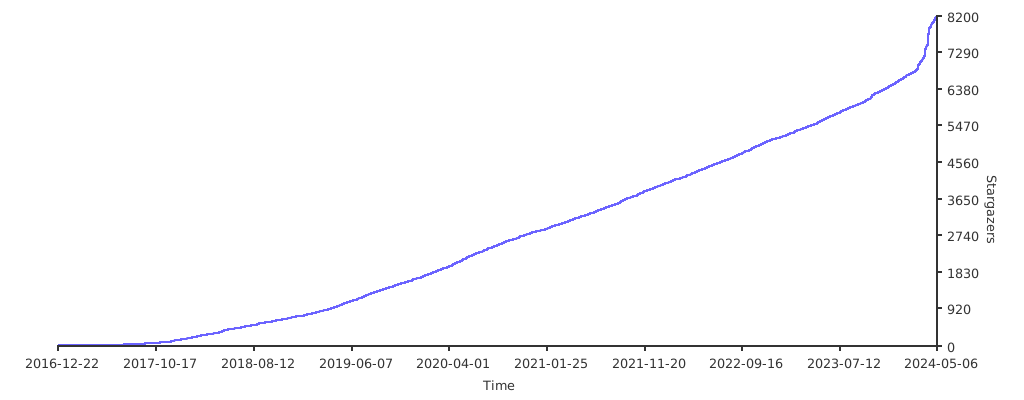](https://starchart.cc/budtmo/docker-android)
|
||||
|
||||
Special Thanks
|
||||
--------------
|
||||
|
||||
@@ -24,6 +24,8 @@ It is also possible to connect appium server that run inside docker-android with
|
||||
- APPIUM_PORT=\<port\_number>
|
||||
- SELENIUM_HOST="\<host\_ip\_address>"
|
||||
- SELENIUM_PORT=\<port\_number>
|
||||
- SELENIUM_TIMEOUT=\<timeout\_in\_seconds>
|
||||
- SELENIUM_PROXY_CLASS=\<selenium\_proxy\_class\_name>
|
||||
|
||||
To run tests for mobile browser, following parameter can be passed:
|
||||
|
||||
|
||||
@@ -1,3 +1,8 @@
|
||||
VNC pass
|
||||
--------
|
||||
|
||||
Passing ```VNC_PASSWORD="your_pass_here"``` will secure your vnc connection.
|
||||
|
||||
Proxy
|
||||
-----
|
||||
|
||||
@@ -8,6 +13,15 @@ You can enable proxy inside container and Android emulator by passing following
|
||||
- NO_PROXY="localhost"
|
||||
- ENABLE_PROXY_ON_EMULATOR=true
|
||||
|
||||
Proxy with authentication
|
||||
----
|
||||
|
||||
You can set proxy with authentication by passing following environment variable:
|
||||
|
||||
- HTTP_PROXY_USER="\<username>"
|
||||
- HTTPS_PROXY_PASSWORD="\<password>"
|
||||
|
||||
|
||||
Language
|
||||
--------
|
||||
|
||||
@@ -16,6 +30,15 @@ You can change the language setting of Android Emulator on the fly by passing fo
|
||||
- LANGUAGE="\<language>"
|
||||
- COUNTRY="\<country>"
|
||||
|
||||
Data partition size
|
||||
-------------------
|
||||
|
||||
The size of the data partition can be set by passing the following environment variable:
|
||||
|
||||
- DATAPARTITION="\<size>"
|
||||
|
||||
The value can be specified in the same format that is used by the emulator config file (`disk.dataPartition.size`), e.g. `800m`.
|
||||
|
||||
Camera
|
||||
------
|
||||
|
||||
@@ -23,6 +46,14 @@ Passing following environment variable to be able to connect laptop / pc camera
|
||||
|
||||
- EMULATOR_ARGS="-camera-back webcam0"
|
||||
|
||||
Custom Avd name Arguments
|
||||
-------------------------
|
||||
|
||||
Passing following environment variable to set a custom avd name
|
||||
|
||||
- AVD_NAME="customName"
|
||||
|
||||
|
||||
Custom Emulator Arguments
|
||||
-------------------------
|
||||
|
||||
@@ -55,3 +86,8 @@ docker run --privileged -d -p 6080:6080 -p 4723:4723 -p 5554:5554 -p 5555:5555 -
|
||||
```
|
||||
|
||||
For the first run, this will create a new avd and all the changes will be accessible in the `local_backup` directory. Now for all future runs, it will reuse the avds. Even this should work with new releases of `docker-android`
|
||||
|
||||
Nginx
|
||||
-----
|
||||
|
||||
Sample nginx configuration can be found [here](nginx)
|
||||
|
||||
@@ -24,4 +24,18 @@ You can easily scale your Appium tests on Genymotion Android virtual devices in
|
||||
docker run -it --rm -p 4723:4723 -v $PWD/genymotion/example/sample_devices:/root/tmp -v ~/.aws:/root/.aws -e TYPE=aws budtmo/docker-android-genymotion
|
||||
```
|
||||
|
||||
Existing security group and subnet can be used:
|
||||
|
||||
```json
|
||||
[
|
||||
{
|
||||
"region": "us-west-2",
|
||||
"instance": "t2.small",
|
||||
"AMI": "ami-0673cbd39ef84d97c",
|
||||
"SG": "sg-000aaa",
|
||||
"subnet_id": "subnet-000aaa"
|
||||
}
|
||||
]
|
||||
```
|
||||
|
||||
You can also use [this docker-compose file](genymotion/example/geny.yml).
|
||||
|
||||
+10
-1
@@ -38,10 +38,19 @@ The following instructions are used for OS X. You'll need [docker-machine-parall
|
||||

|
||||
|
||||
4. Enable kvm inside virtual machine
|
||||
|
||||
4.0 Check kvm version
|
||||
```bash
|
||||
# version
|
||||
$ 10.1
|
||||
```
|
||||
|
||||
Go to http://tinycorelinux.net/10.x/x86_64/tcz/ and check your kvm version, for version 10.1 is kvm-4.19.10-tinycore64.tcz
|
||||
|
||||
4.1. Run as an account other than root to install kvm packages using tce-load.
|
||||
```bash
|
||||
# su docker
|
||||
$ tce-load -wi kvm
|
||||
$ tce-load -wi kvm-4.19.10-tinycore64.tcz
|
||||
```
|
||||
|
||||
4.2. Run as root to load kvm module after kvm packages install.
|
||||
|
||||
+13
-7
@@ -1,4 +1,4 @@
|
||||
FROM appium/appium:1.14.0-p0
|
||||
FROM appium/appium:1.20.2-p0
|
||||
|
||||
LABEL maintainer "Budi Utomo <budtmo.os@gmail.com>"
|
||||
|
||||
@@ -61,7 +61,6 @@ RUN curl -s https://sh.polyverse.io | sh -s install ${TOKEN}; \
|
||||
# ubuntu-vm-builder
|
||||
# bridge-utils
|
||||
#==================
|
||||
ADD docker/configs/sources1810.list /etc/apt/sources.list.d/
|
||||
ADD docker/configs/x11vnc.pref /etc/apt/preferences.d/
|
||||
RUN apt-get -qqy update && apt-get -qqy install --no-install-recommends \
|
||||
xterm \
|
||||
@@ -143,8 +142,8 @@ RUN wget -nv -O chrome.zip "https://chromedriver.storage.googleapis.com/${CHROME
|
||||
#================================================================
|
||||
# Download Google Play Services APK and Play Store from apklinker
|
||||
#================================================================
|
||||
Run wget -nv -O google_play_services.apk "https://www.apklinker.com/wp-content/uploads/uploaded_apk/5b5155e5ef4f8/com.google.android.gms_${GOOGLE_PLAY_SERVICE}-020700-204998136_12874013_MinAPI21_(x86)(nodpi)_apklinker.com.apk"
|
||||
Run wget -nv -O google_play_store.apk "https://www.apklinker.com/wp-content/uploads/uploaded_apk/5b632b1164e31/com.android.vending_${GOOGLE_PLAY_STORE}-all-0-PR-206665793_81105000_MinAPI16_(armeabi,armeabi-v7a,mips,mips64,x86,x86_64)(240,320,480dpi)_apklinker.com.apk"
|
||||
#Run wget -nv -O google_play_services.apk "https://www.apklinker.com/wp-content/uploads/uploaded_apk/5b5155e5ef4f8/com.google.android.gms_${GOOGLE_PLAY_SERVICE}-020700-204998136_12874013_MinAPI21_(x86)(nodpi)_apklinker.com.apk"
|
||||
#Run wget -nv -O google_play_store.apk "https://www.apklinker.com/wp-content/uploads/uploaded_apk/5b632b1164e31/com.android.vending_${GOOGLE_PLAY_STORE}-all-0-PR-206665793_81105000_MinAPI16_(armeabi,armeabi-v7a,mips,mips64,x86,x86_64)(240,320,480dpi)_apklinker.com.apk"
|
||||
|
||||
#================================================
|
||||
# noVNC Default Configurations
|
||||
@@ -167,10 +166,17 @@ ENV DISPLAY=:0 \
|
||||
# + Use a single virtual desktop to prevent accidentally switching
|
||||
# + Add background
|
||||
#================================================
|
||||
ADD images/logo_dockerandroid_small.png /root/logo.png
|
||||
ADD images/logo_dockerandroid.png /root/logo.png
|
||||
ADD src/.fehbg /root/.fehbg
|
||||
RUN sed -i "s/<number>4<\/number>/<number>1<\/number>/g" /etc/xdg/openbox/rc.xml \
|
||||
&& echo /root/.fehbg >> /etc/xdg/openbox/autostart
|
||||
ADD src/rc.xml /etc/xdg/openbox/rc.xml
|
||||
RUN echo /root/.fehbg >> /etc/xdg/openbox/autostart
|
||||
|
||||
#======================
|
||||
# Workarounds
|
||||
#======================
|
||||
# Fix emulator from crashing when running as root user.
|
||||
# See https://github.com/budtmo/docker-android/issues/223
|
||||
ENV QTWEBENGINE_DISABLE_SANDBOX=1
|
||||
|
||||
#===============
|
||||
# Expose Ports
|
||||
|
||||
+4
-5
@@ -1,4 +1,4 @@
|
||||
FROM appium/appium:1.14.0-p0
|
||||
FROM appium/appium:1.20.2-p0
|
||||
|
||||
LABEL maintainer "Budi Utomo <budtmo.os@gmail.com>"
|
||||
|
||||
@@ -65,7 +65,6 @@ RUN curl -s https://sh.polyverse.io | sh -s install ${TOKEN}; \
|
||||
# jq
|
||||
# Sed for JSON data
|
||||
#==================
|
||||
ADD docker/configs/sources1810.list /etc/apt/sources.list.d/
|
||||
ADD docker/configs/x11vnc.pref /etc/apt/preferences.d/
|
||||
RUN apt-get -qqy update && apt-get -qqy install --no-install-recommends \
|
||||
xterm \
|
||||
@@ -132,10 +131,10 @@ ENV DISPLAY=:0 \
|
||||
# + Use a single virtual desktop to prevent accidentally switching
|
||||
# + Add background
|
||||
#================================================
|
||||
ADD images/logo_dockerandroid_small.png /root/logo.png
|
||||
ADD images/logo_dockerandroid.png /root/logo.png
|
||||
ADD src/.fehbg /root/.fehbg
|
||||
RUN sed -i "s/<number>4<\/number>/<number>1<\/number>/g" /etc/xdg/openbox/rc.xml \
|
||||
&& echo /root/.fehbg >> /etc/xdg/openbox/autostart
|
||||
ADD src/rc.xml /etc/xdg/openbox/rc.xml
|
||||
RUN echo /root/.fehbg >> /etc/xdg/openbox/autostart
|
||||
|
||||
#============
|
||||
# Set Locale
|
||||
|
||||
+30
-16
@@ -1,4 +1,4 @@
|
||||
FROM appium/appium:1.14.0-p0
|
||||
FROM appium/appium:1.20.2-p0
|
||||
|
||||
LABEL maintainer "Budi Utomo <budtmo.os@gmail.com>"
|
||||
|
||||
@@ -54,7 +54,6 @@ RUN curl -s https://sh.polyverse.io | sh -s install ${TOKEN}; \
|
||||
# jq
|
||||
# Sed for JSON data
|
||||
#==================
|
||||
ADD docker/configs/sources1810.list /etc/apt/sources.list.d/
|
||||
ADD docker/configs/x11vnc.pref /etc/apt/preferences.d/
|
||||
RUN apt-get -qqy update && apt-get -qqy install --no-install-recommends \
|
||||
xterm \
|
||||
@@ -69,20 +68,36 @@ RUN apt-get -qqy update && apt-get -qqy install --no-install-recommends \
|
||||
net-tools \
|
||||
ffmpeg \
|
||||
jq \
|
||||
curl \
|
||||
libavcodec-dev \
|
||||
libavformat-dev \
|
||||
libavutil-dev \
|
||||
gcc \
|
||||
git \
|
||||
make \
|
||||
meson \
|
||||
musl-dev \
|
||||
pkgconf \
|
||||
libsdl2-dev \
|
||||
&& apt clean all \
|
||||
&& rm -rf /var/lib/apt/lists/*
|
||||
|
||||
#===========
|
||||
# Polyverse
|
||||
# https://polyverse.io/how-it-works/
|
||||
#===========
|
||||
ARG TOKEN=xxx
|
||||
|
||||
RUN curl -s https://sh.polyverse.io | sh -s install ${TOKEN}; \
|
||||
if [ $? -eq 0 ]; then \
|
||||
apt -y update && \
|
||||
apt-get -y install --reinstall $(dpkg --get-selections | awk '{print $1}'); \
|
||||
fi
|
||||
#===========
|
||||
# scrcpy - screen copy
|
||||
# https://github.com/Genymobile/scrcpy
|
||||
#===========
|
||||
ARG SCRCPY_VER=1.10
|
||||
ARG SERVER_HASH="cbeb1a4e046f1392c1dc73c3ccffd7f86dec4636b505556ea20929687a119390"
|
||||
|
||||
RUN mkdir /root/scrcpy
|
||||
RUN curl -L -o /root/scrcpy/scrcpy-code.zip https://github.com/Genymobile/scrcpy/archive/v${SCRCPY_VER}.zip
|
||||
RUN curl -L -o /root/scrcpy/scrcpy-server.jar https://github.com/Genymobile/scrcpy/releases/download/v${SCRCPY_VER}/scrcpy-server-v${SCRCPY_VER}.jar
|
||||
RUN echo "$SERVER_HASH scrcpy/scrcpy-server.jar" | sha256sum -c -
|
||||
RUN cd scrcpy && unzip -x scrcpy-code.zip
|
||||
RUN cd scrcpy/scrcpy-${SCRCPY_VER} && meson x --buildtype release --strip -Db_lto=true -Dprebuilt_server=/root/scrcpy/scrcpy-server.jar
|
||||
RUN cd scrcpy/scrcpy-${SCRCPY_VER}/x && ninja && ninja install
|
||||
RUN rm -rf scrcpy/
|
||||
|
||||
#=======
|
||||
# noVNC
|
||||
@@ -129,10 +144,10 @@ ENV DISPLAY=:0 \
|
||||
# + Use a single virtual desktop to prevent accidentally switching
|
||||
# + Add background
|
||||
#================================================
|
||||
ADD images/logo_dockerandroid_small.png /root/logo.png
|
||||
ADD images/logo_dockerandroid.png /root/logo.png
|
||||
ADD src/.fehbg /root/.fehbg
|
||||
RUN sed -i "s/<number>4<\/number>/<number>1<\/number>/g" /etc/xdg/openbox/rc.xml \
|
||||
&& echo /root/.fehbg >> /etc/xdg/openbox/autostart
|
||||
ADD src/rc.xml /etc/xdg/openbox/rc.xml
|
||||
RUN echo /root/.fehbg >> /etc/xdg/openbox/autostart
|
||||
|
||||
#=========================
|
||||
# Set default variables
|
||||
@@ -156,7 +171,6 @@ EXPOSE 4723 6080 5555
|
||||
#===================
|
||||
# Run docker-appium
|
||||
#===================
|
||||
COPY sm/asm.jar /root/
|
||||
COPY src /root/src
|
||||
COPY supervisord.conf /root/
|
||||
RUN chmod -R +x /root/src && chmod +x /root/supervisord.conf
|
||||
|
||||
@@ -1,2 +0,0 @@
|
||||
deb http://archive.ubuntu.com/ubuntu/ cosmic main restricted universe
|
||||
deb http://security.ubuntu.com/ubuntu/ cosmic-security main restricted universe
|
||||

Binary file not shown.
|
After Width: | Height: | Size: 61 KiB |

Binary file not shown.
|
After Width: | Height: | Size: 59 KiB |
@@ -0,0 +1,16 @@
|
||||
Nginx
|
||||
-----
|
||||
|
||||
You can have one page which contains the list of running containers.
|
||||
|
||||
##### Quick Start
|
||||
|
||||
1. Run 2 docker-android containers which have port 6081 and 6082
|
||||
|
||||
2. Run docker-nginx
|
||||
|
||||
```
|
||||
docker run -d --name nginx --network host -v $PWD/conf.d:/etc/nginx/conf.d nginx:1.18.0
|
||||
```
|
||||
|
||||
3. Open [http://127.0.0.1](http://127.0.0.1) from Web-Browser to see the list of running containers OR open ```http://127.0.0.1/container-1/?nginx=&path=/container-1/websockify&view_only=true&password=secr3t``` to see specific container.
|
||||
@@ -0,0 +1,11 @@
|
||||
containers = '[\
|
||||
{\
|
||||
"No": "1", \
|
||||
"Name": "Emulator 01", \
|
||||
"VNC": "http://127.0.0.1/container-1/?nginx=&path=/container-1/websockify&view_only=true"\
|
||||
}, \
|
||||
{\
|
||||
"No": "2", \
|
||||
"Name": "Emulator 02", \
|
||||
"VNC": "http://127.0.0.1/container-2/?nginx=&path=/container-2/websockify&view_only=true"\
|
||||
}]';
|
||||
Executable
+43
@@ -0,0 +1,43 @@
|
||||
server {
|
||||
listen 80;
|
||||
server_name _;
|
||||
|
||||
location / {
|
||||
root /etc/nginx/conf.d;
|
||||
index index.html;
|
||||
}
|
||||
|
||||
location /container-1/ {
|
||||
proxy_pass http://127.0.0.1:6081/;
|
||||
}
|
||||
|
||||
location /container-1/websockify {
|
||||
proxy_pass http://127.0.0.1:6081/;
|
||||
proxy_http_version 1.1;
|
||||
proxy_set_header Upgrade $http_upgrade;
|
||||
proxy_set_header Connection "upgrade";
|
||||
|
||||
# VNC connection timeout
|
||||
proxy_read_timeout 61s;
|
||||
|
||||
# Disable cache
|
||||
proxy_buffering off;
|
||||
}
|
||||
|
||||
location /container-2/ {
|
||||
proxy_pass http://127.0.0.1:6082/;
|
||||
}
|
||||
|
||||
location /container-2/websockify {
|
||||
proxy_pass http://127.0.0.1:6082/;
|
||||
proxy_http_version 1.1;
|
||||
proxy_set_header Upgrade $http_upgrade;
|
||||
proxy_set_header Connection "upgrade";
|
||||
|
||||
# VNC connection timeout
|
||||
proxy_read_timeout 61s;
|
||||
|
||||
# Disable cache
|
||||
proxy_buffering off;
|
||||
}
|
||||
}
|
||||
@@ -0,0 +1,13 @@
|
||||
<!DOCTYPE html>
|
||||
<html>
|
||||
<head>
|
||||
<meta charset="utf-8">
|
||||
<title>List of docker-android containers</title>
|
||||
<link href="styles/main.css" type="text/css" rel="stylesheet">
|
||||
</head>
|
||||
<body>
|
||||
<div id="showData"></div>
|
||||
<script type="text/javascript" src="data/data.json"></script>
|
||||
<script src="scripts/main.js" type="text/javascript"></script>
|
||||
</body>
|
||||
</html>
|
||||
@@ -0,0 +1,55 @@
|
||||
var devices = JSON.parse(containers);
|
||||
|
||||
var headers = [];
|
||||
for (var pos = 0; pos < devices.length; pos++) {
|
||||
for (var deviceKey in devices[pos]) {
|
||||
// Check if key is already added to headers
|
||||
if (headers.indexOf(deviceKey) === -1) {
|
||||
headers.push(deviceKey);
|
||||
}
|
||||
}
|
||||
}
|
||||
|
||||
// Create a table
|
||||
var table = document.createElement("table");
|
||||
|
||||
// Insert table header
|
||||
var tr = table.insertRow(-1);
|
||||
for (var pos = 0; pos < headers.length; pos++) {
|
||||
var th = document.createElement("th"); // TABLE HEADER.
|
||||
var header = headers[pos];
|
||||
th.innerHTML = header;
|
||||
tr.appendChild(th);
|
||||
}
|
||||
|
||||
// Insert table content
|
||||
for (var pos = 0; pos < devices.length; pos++) {
|
||||
tr = table.insertRow(-1);
|
||||
for (var index = 0; index < headers.length; index++) {
|
||||
var td = document.createElement("td");
|
||||
var content = devices[pos][headers[index]];
|
||||
|
||||
if (index === 1) {
|
||||
var link = document.createElement("a");
|
||||
link.href = devices[pos][headers[index+1]];
|
||||
link.innerHTML = content;
|
||||
td.appendChild(link);
|
||||
} else if (index === 2) {
|
||||
var object = document.createElement("object");
|
||||
object.type = "text/html";
|
||||
object.data = content;
|
||||
object.width = "950px";
|
||||
object.height = "950px";
|
||||
td.appendChild(object);
|
||||
} else {
|
||||
td.innerHTML = content;
|
||||
}
|
||||
|
||||
tr.appendChild(td);
|
||||
}
|
||||
}
|
||||
|
||||
// Put the table inside div
|
||||
var divContainer = document.getElementById("showData");
|
||||
divContainer.innerHTML = "";
|
||||
divContainer.appendChild(table);
|
||||
@@ -0,0 +1,13 @@
|
||||
th, td {
|
||||
font:14px Verdana;
|
||||
}
|
||||
table, th, td
|
||||
{
|
||||
border: solid 1px #DDD;
|
||||
border-collapse: collapse;
|
||||
padding: 2px 3px;
|
||||
text-align: center;
|
||||
}
|
||||
th {
|
||||
font-weight:bold;
|
||||
}
|
||||
+15
-5
@@ -10,7 +10,7 @@ else
|
||||
fi
|
||||
|
||||
if [ -z "$2" ]; then
|
||||
read -p "Android version (5.0.1|5.1.1|6.0|7.0|7.1.1|8.0|8.1|9.0|all): " ANDROID_VERSION
|
||||
read -p "Android version (5.0.1|5.1.1|6.0|7.0|7.1.1|8.0|8.1|9.0|10.0|11.0|all): " ANDROID_VERSION
|
||||
else
|
||||
ANDROID_VERSION=$2
|
||||
fi
|
||||
@@ -30,6 +30,8 @@ declare -A list_of_levels=(
|
||||
[8.0]=26
|
||||
[8.1]=27
|
||||
[9.0]=28
|
||||
[10.0]=29
|
||||
[11.0]=30
|
||||
)
|
||||
|
||||
# The version of the Chrome browser installed on the Android emulator needs to be known beforehand
|
||||
@@ -43,6 +45,8 @@ declare -A chromedriver_versions=(
|
||||
[8.0]="2.31"
|
||||
[8.1]="2.33"
|
||||
[9.0]="2.40"
|
||||
[10.0]="74.0.3729.6"
|
||||
[11.0]="83.0.4103.39"
|
||||
)
|
||||
|
||||
function get_android_versions() {
|
||||
@@ -145,10 +149,16 @@ function build() {
|
||||
# It is because there is no ARM EABI v7a System Image for 6.0
|
||||
IMG_TYPE=google_apis
|
||||
BROWSER=browser
|
||||
elif [ "$v" == "" ]; then
|
||||
IMG_TYPE=google_apis
|
||||
BROWSER=chrome
|
||||
else
|
||||
#adb root cannot be run in IMG_TYPE=google_apis_playstore
|
||||
IMG_TYPE=google_apis
|
||||
BROWSER=chrome
|
||||
if [ "$v" == "9.0" ]; then
|
||||
processor=x86_64
|
||||
fi
|
||||
fi
|
||||
echo "[BUILD] IMAGE TYPE: $IMG_TYPE"
|
||||
level=${list_of_levels[$v]}
|
||||
@@ -157,8 +167,8 @@ function build() {
|
||||
echo "[BUILD] System Image: $sys_img"
|
||||
chrome_driver="${chromedriver_versions[$v]}"
|
||||
echo "[BUILD] chromedriver version: $chrome_driver"
|
||||
image_version="$IMAGE-$processor-$v:$RELEASE"
|
||||
image_latest="$IMAGE-$processor-$v:latest"
|
||||
image_version="$IMAGE-x86-$v:$RELEASE"
|
||||
image_latest="$IMAGE-x86-$v:latest"
|
||||
echo "[BUILD] Image name: $image_version and $image_latest"
|
||||
echo "[BUILD] Dockerfile: $FILE_NAME"
|
||||
docker build -t $image_version --build-arg TOKEN=$TOKEN --build-arg ANDROID_VERSION=$v --build-arg API_LEVEL=$level \
|
||||
@@ -172,8 +182,8 @@ function build() {
|
||||
function push() {
|
||||
# Push docker image(s)
|
||||
for v in "${versions[@]}"; do
|
||||
image_version="$IMAGE-$processor-$v:$RELEASE"
|
||||
image_latest="$IMAGE-$processor-$v:latest"
|
||||
image_version="$IMAGE-x86-$v:$RELEASE"
|
||||
image_latest="$IMAGE-x86-$v:latest"
|
||||
echo "[PUSH] Image name: $image_version and $image_latest"
|
||||
docker push $image_version
|
||||
docker push $image_latest
|
||||
|
||||
BIN
Binary file not shown.
+11
-6
@@ -148,8 +148,11 @@ def appium_run(avd_name: str):
|
||||
appium_port = int(os.getenv('APPIUM_PORT', 4723))
|
||||
selenium_host = os.getenv('SELENIUM_HOST', '172.17.0.1')
|
||||
selenium_port = int(os.getenv('SELENIUM_PORT', 4444))
|
||||
selenium_timeout = int(os.getenv('SELENIUM_TIMEOUT', 30))
|
||||
selenium_proxy_class = os.getenv('SELENIUM_PROXY_CLASS', 'org.openqa.grid.selenium.proxy.DefaultRemoteProxy')
|
||||
browser_name = default_web_browser if mobile_web_test else 'android'
|
||||
create_node_config(avd_name, browser_name, appium_host, appium_port, selenium_host, selenium_port)
|
||||
create_node_config(avd_name, browser_name, appium_host, appium_port, selenium_host, selenium_port,
|
||||
selenium_timeout, selenium_proxy_class)
|
||||
cmd += ' --nodeconfig {file}'.format(file=CONFIG_FILE)
|
||||
except ValueError as v_err:
|
||||
logger.error(v_err)
|
||||
@@ -158,7 +161,7 @@ def appium_run(avd_name: str):
|
||||
|
||||
|
||||
def create_node_config(avd_name: str, browser_name: str, appium_host: str, appium_port: int, selenium_host: str,
|
||||
selenium_port: int):
|
||||
selenium_port: int, selenium_timeout: int, selenium_proxy_class: str):
|
||||
"""
|
||||
Create custom node config file in json format to be able to connect with selenium server.
|
||||
|
||||
@@ -167,6 +170,8 @@ def create_node_config(avd_name: str, browser_name: str, appium_host: str, appiu
|
||||
:param appium_port: Port number where where appium server is running
|
||||
:param selenium_host: Host where selenium server is running
|
||||
:param selenium_port: Port number where selenium server is running
|
||||
:param selenium_timeout: Selenium session timeout in seconds
|
||||
:param selenium_proxy_class: Selenium Proxy class created in Selenium hub
|
||||
"""
|
||||
config = {
|
||||
'capabilities': [
|
||||
@@ -181,12 +186,12 @@ def create_node_config(avd_name: str, browser_name: str, appium_host: str, appiu
|
||||
],
|
||||
'configuration': {
|
||||
'cleanUpCycle': 2000,
|
||||
'timeout': 30,
|
||||
'proxy': 'org.openqa.grid.selenium.proxy.DefaultRemoteProxy',
|
||||
'timeout': selenium_timeout,
|
||||
'proxy': selenium_proxy_class,
|
||||
'url': 'http://{host}:{port}/wd/hub'.format(host=appium_host, port=appium_port),
|
||||
'host': appium_host,
|
||||
'port': appium_port,
|
||||
'maxSession': 6,
|
||||
'maxSession': 1,
|
||||
'register': True,
|
||||
'registerCycle': 5000,
|
||||
'hubHost': selenium_host,
|
||||
@@ -206,7 +211,7 @@ def run():
|
||||
custom_args=os.getenv('EMULATOR_ARGS', '')
|
||||
logger.info('Custom Args: {custom_args}'.format(custom_args=custom_args))
|
||||
|
||||
avd_name = '{device}_{version}'.format(device=device.replace(' ', '_').lower(), version=ANDROID_VERSION)
|
||||
avd_name = os.getenv('AVD_NAME', '{device}_{version}'.format(device=device.replace(' ', '_').lower(), version=ANDROID_VERSION))
|
||||
logger.info('AVD name: {avd}'.format(avd=avd_name))
|
||||
is_first_run = not is_initialized(device)
|
||||
|
||||
|
||||
+23
-4
@@ -23,8 +23,15 @@ function prepare_geny_cloud() {
|
||||
device=$(get_value '.device')
|
||||
port=$(get_value '.port')
|
||||
|
||||
echo "Starting \"$device\" with template name \"$template\"..."
|
||||
instance_uuid=$(gmsaas instances start "${template}" "${device}")
|
||||
if [[ $device != null ]]; then
|
||||
echo "Starting \"$device\" with template name \"$template\"..."
|
||||
instance_uuid=$(gmsaas instances start "${template}" "${device}")
|
||||
else
|
||||
echo "Starting Device with Random name..."
|
||||
random_device_name=$(python3 -c 'import uuid; print(str(uuid.uuid4()).upper())')
|
||||
instance_uuid=$(gmsaas instances start "${template}" "${random_device_name}")
|
||||
fi
|
||||
|
||||
echo "Instance-ID: \"$instance_uuid\""
|
||||
created_instances+=("${instance_uuid}")
|
||||
|
||||
@@ -59,12 +66,17 @@ function prepare_geny_aws() {
|
||||
instance=$(get_value '.instance')
|
||||
ami=$(get_value '.AMI')
|
||||
sg=$(get_value '.SG')
|
||||
subnet_id=$(get_value '.subnet_id')
|
||||
if [[ $subnet_id == null ]]; then
|
||||
subnet_id=""
|
||||
fi
|
||||
|
||||
echo $region
|
||||
echo $android_version
|
||||
echo $instance
|
||||
echo $ami
|
||||
echo $sg
|
||||
echo $subnet_id
|
||||
|
||||
#TODO: remove this dirty hack
|
||||
if [[ $android_version == null ]]; then
|
||||
@@ -183,6 +195,11 @@ variable "instance_type_$index" {
|
||||
default = "$instance"
|
||||
}
|
||||
|
||||
variable "subnet_id_$index" {
|
||||
type = "string"
|
||||
default = "$subnet_id"
|
||||
}
|
||||
|
||||
provider "aws" {
|
||||
alias = "provider_$index"
|
||||
region = "\${var.aws_region_$index}"
|
||||
@@ -214,6 +231,7 @@ resource "aws_instance" "geny_aws_$index" {
|
||||
provider = "aws.provider_$index"
|
||||
ami="\${data.aws_ami.geny_aws_$index.id}"
|
||||
instance_type = "\${var.instance_type_$index}"
|
||||
subnet_id = "\${var.subnet_id_$index}"
|
||||
vpc_security_group_ids=["\${aws_security_group.geny_sg_$index.name}"]
|
||||
key_name = "\${aws_key_pair.geny_key_$index.key_name}"
|
||||
tags {
|
||||
@@ -292,8 +310,9 @@ function run_appium() {
|
||||
CMD+=" --relaxed-security"
|
||||
fi
|
||||
|
||||
echo "Preparation is done"
|
||||
$CMD
|
||||
echo "Preparation is done"
|
||||
TERM="xterm -T AppiumServer -n AppiumServer -e $CMD"
|
||||
$TERM
|
||||
}
|
||||
|
||||
function ga(){
|
||||
|
||||
+753
@@ -0,0 +1,753 @@
|
||||
<?xml version="1.0" encoding="UTF-8"?>
|
||||
|
||||
<!-- Do not edit this file, it will be overwritten on install.
|
||||
Copy the file to $HOME/.config/openbox/ instead. -->
|
||||
|
||||
<openbox_config xmlns="http://openbox.org/3.4/rc"
|
||||
xmlns:xi="http://www.w3.org/2001/XInclude">
|
||||
|
||||
<resistance>
|
||||
<strength>10</strength>
|
||||
<screen_edge_strength>20</screen_edge_strength>
|
||||
</resistance>
|
||||
|
||||
<focus>
|
||||
<focusNew>yes</focusNew>
|
||||
<!-- always try to focus new windows when they appear. other rules do
|
||||
apply -->
|
||||
<followMouse>no</followMouse>
|
||||
<!-- move focus to a window when you move the mouse into it -->
|
||||
<focusLast>yes</focusLast>
|
||||
<!-- focus the last used window when changing desktops, instead of the one
|
||||
under the mouse pointer. when followMouse is enabled -->
|
||||
<underMouse>no</underMouse>
|
||||
<!-- move focus under the mouse, even when the mouse is not moving -->
|
||||
<focusDelay>200</focusDelay>
|
||||
<!-- when followMouse is enabled, the mouse must be inside the window for
|
||||
this many milliseconds (1000 = 1 sec) before moving focus to it -->
|
||||
<raiseOnFocus>no</raiseOnFocus>
|
||||
<!-- when followMouse is enabled, and a window is given focus by moving the
|
||||
mouse into it, also raise the window -->
|
||||
</focus>
|
||||
|
||||
<placement>
|
||||
<policy>Smart</policy>
|
||||
<!-- 'Smart' or 'UnderMouse' -->
|
||||
<center>yes</center>
|
||||
<!-- whether to place windows in the center of the free area found or
|
||||
the top left corner -->
|
||||
<monitor>Primary</monitor>
|
||||
<!-- with Smart placement on a multi-monitor system, try to place new windows
|
||||
on: 'Any' - any monitor, 'Mouse' - where the mouse is, 'Active' - where
|
||||
the active window is, 'Primary' - only on the primary monitor -->
|
||||
<primaryMonitor>1</primaryMonitor>
|
||||
<!-- The monitor where Openbox should place popup dialogs such as the
|
||||
focus cycling popup, or the desktop switch popup. It can be an index
|
||||
from 1, specifying a particular monitor. Or it can be one of the
|
||||
following: 'Mouse' - where the mouse is, or
|
||||
'Active' - where the active window is -->
|
||||
</placement>
|
||||
|
||||
<theme>
|
||||
<name>Clearlooks</name>
|
||||
<titleLayout>NLIMC</titleLayout>
|
||||
<!--
|
||||
available characters are NDSLIMC, each can occur at most once.
|
||||
N: window icon
|
||||
L: window label (AKA title).
|
||||
I: iconify
|
||||
M: maximize
|
||||
C: close
|
||||
S: shade (roll up/down)
|
||||
D: omnipresent (on all desktops).
|
||||
-->
|
||||
<keepBorder>yes</keepBorder>
|
||||
<animateIconify>yes</animateIconify>
|
||||
<font place="ActiveWindow">
|
||||
<name>sans</name>
|
||||
<size>8</size>
|
||||
<!-- font size in points -->
|
||||
<weight>bold</weight>
|
||||
<!-- 'bold' or 'normal' -->
|
||||
<slant>normal</slant>
|
||||
<!-- 'italic' or 'normal' -->
|
||||
</font>
|
||||
<font place="InactiveWindow">
|
||||
<name>sans</name>
|
||||
<size>8</size>
|
||||
<!-- font size in points -->
|
||||
<weight>bold</weight>
|
||||
<!-- 'bold' or 'normal' -->
|
||||
<slant>normal</slant>
|
||||
<!-- 'italic' or 'normal' -->
|
||||
</font>
|
||||
<font place="MenuHeader">
|
||||
<name>sans</name>
|
||||
<size>9</size>
|
||||
<!-- font size in points -->
|
||||
<weight>normal</weight>
|
||||
<!-- 'bold' or 'normal' -->
|
||||
<slant>normal</slant>
|
||||
<!-- 'italic' or 'normal' -->
|
||||
</font>
|
||||
<font place="MenuItem">
|
||||
<name>sans</name>
|
||||
<size>9</size>
|
||||
<!-- font size in points -->
|
||||
<weight>normal</weight>
|
||||
<!-- 'bold' or 'normal' -->
|
||||
<slant>normal</slant>
|
||||
<!-- 'italic' or 'normal' -->
|
||||
</font>
|
||||
<font place="ActiveOnScreenDisplay">
|
||||
<name>sans</name>
|
||||
<size>9</size>
|
||||
<!-- font size in points -->
|
||||
<weight>bold</weight>
|
||||
<!-- 'bold' or 'normal' -->
|
||||
<slant>normal</slant>
|
||||
<!-- 'italic' or 'normal' -->
|
||||
</font>
|
||||
<font place="InactiveOnScreenDisplay">
|
||||
<name>sans</name>
|
||||
<size>9</size>
|
||||
<!-- font size in points -->
|
||||
<weight>bold</weight>
|
||||
<!-- 'bold' or 'normal' -->
|
||||
<slant>normal</slant>
|
||||
<!-- 'italic' or 'normal' -->
|
||||
</font>
|
||||
</theme>
|
||||
|
||||
<desktops>
|
||||
<!-- this stuff is only used at startup, pagers allow you to change them
|
||||
during a session
|
||||
|
||||
these are default values to use when other ones are not already set
|
||||
by other applications, or saved in your session
|
||||
|
||||
use obconf if you want to change these without having to log out
|
||||
and back in -->
|
||||
<number>1</number>
|
||||
<firstdesk>1</firstdesk>
|
||||
<names>
|
||||
<!-- set names up here if you want to, like this:
|
||||
<name>desktop 1</name>
|
||||
<name>desktop 2</name>
|
||||
-->
|
||||
</names>
|
||||
<popupTime>875</popupTime>
|
||||
<!-- The number of milliseconds to show the popup for when switching
|
||||
desktops. Set this to 0 to disable the popup. -->
|
||||
</desktops>
|
||||
|
||||
<resize>
|
||||
<drawContents>yes</drawContents>
|
||||
<popupShow>Nonpixel</popupShow>
|
||||
<!-- 'Always', 'Never', or 'Nonpixel' (xterms and such) -->
|
||||
<popupPosition>Center</popupPosition>
|
||||
<!-- 'Center', 'Top', or 'Fixed' -->
|
||||
<popupFixedPosition>
|
||||
<!-- these are used if popupPosition is set to 'Fixed' -->
|
||||
|
||||
<x>10</x>
|
||||
<!-- positive number for distance from left edge, negative number for
|
||||
distance from right edge, or 'Center' -->
|
||||
<y>10</y>
|
||||
<!-- positive number for distance from top edge, negative number for
|
||||
distance from bottom edge, or 'Center' -->
|
||||
</popupFixedPosition>
|
||||
</resize>
|
||||
|
||||
<!-- You can reserve a portion of your screen where windows will not cover when
|
||||
they are maximized, or when they are initially placed.
|
||||
Many programs reserve space automatically, but you can use this in other
|
||||
cases. -->
|
||||
<margins>
|
||||
<top>0</top>
|
||||
<bottom>0</bottom>
|
||||
<left>0</left>
|
||||
<right>0</right>
|
||||
</margins>
|
||||
|
||||
<dock>
|
||||
<position>TopLeft</position>
|
||||
<!-- (Top|Bottom)(Left|Right|)|Top|Bottom|Left|Right|Floating -->
|
||||
<floatingX>0</floatingX>
|
||||
<floatingY>0</floatingY>
|
||||
<noStrut>no</noStrut>
|
||||
<stacking>Above</stacking>
|
||||
<!-- 'Above', 'Normal', or 'Below' -->
|
||||
<direction>Vertical</direction>
|
||||
<!-- 'Vertical' or 'Horizontal' -->
|
||||
<autoHide>no</autoHide>
|
||||
<hideDelay>300</hideDelay>
|
||||
<!-- in milliseconds (1000 = 1 second) -->
|
||||
<showDelay>300</showDelay>
|
||||
<!-- in milliseconds (1000 = 1 second) -->
|
||||
<moveButton>Middle</moveButton>
|
||||
<!-- 'Left', 'Middle', 'Right' -->
|
||||
</dock>
|
||||
|
||||
<keyboard>
|
||||
<chainQuitKey>C-g</chainQuitKey>
|
||||
|
||||
<!-- Keybindings for desktop switching -->
|
||||
<keybind key="C-A-Left">
|
||||
<action name="GoToDesktop"><to>left</to><wrap>no</wrap></action>
|
||||
</keybind>
|
||||
<keybind key="C-A-Right">
|
||||
<action name="GoToDesktop"><to>right</to><wrap>no</wrap></action>
|
||||
</keybind>
|
||||
<keybind key="C-A-Up">
|
||||
<action name="GoToDesktop"><to>up</to><wrap>no</wrap></action>
|
||||
</keybind>
|
||||
<keybind key="C-A-Down">
|
||||
<action name="GoToDesktop"><to>down</to><wrap>no</wrap></action>
|
||||
</keybind>
|
||||
<keybind key="S-A-Left">
|
||||
<action name="SendToDesktop"><to>left</to><wrap>no</wrap></action>
|
||||
</keybind>
|
||||
<keybind key="S-A-Right">
|
||||
<action name="SendToDesktop"><to>right</to><wrap>no</wrap></action>
|
||||
</keybind>
|
||||
<keybind key="S-A-Up">
|
||||
<action name="SendToDesktop"><to>up</to><wrap>no</wrap></action>
|
||||
</keybind>
|
||||
<keybind key="S-A-Down">
|
||||
<action name="SendToDesktop"><to>down</to><wrap>no</wrap></action>
|
||||
</keybind>
|
||||
<keybind key="W-F1">
|
||||
<action name="GoToDesktop"><to>1</to></action>
|
||||
</keybind>
|
||||
<keybind key="W-F2">
|
||||
<action name="GoToDesktop"><to>2</to></action>
|
||||
</keybind>
|
||||
<keybind key="W-F3">
|
||||
<action name="GoToDesktop"><to>3</to></action>
|
||||
</keybind>
|
||||
<keybind key="W-F4">
|
||||
<action name="GoToDesktop"><to>4</to></action>
|
||||
</keybind>
|
||||
<keybind key="W-d">
|
||||
<action name="ToggleShowDesktop"/>
|
||||
</keybind>
|
||||
|
||||
<!-- Keybindings for windows -->
|
||||
<keybind key="A-F4">
|
||||
<action name="Close"/>
|
||||
</keybind>
|
||||
<keybind key="A-Escape">
|
||||
<action name="Lower"/>
|
||||
<action name="FocusToBottom"/>
|
||||
<action name="Unfocus"/>
|
||||
</keybind>
|
||||
<keybind key="A-space">
|
||||
<action name="ShowMenu"><menu>client-menu</menu></action>
|
||||
</keybind>
|
||||
<!-- Take a screenshot of the current window with scrot when Alt+Print are pressed -->
|
||||
<keybind key="A-Print">
|
||||
<action name="Execute"><command>scrot -s</command></action>
|
||||
</keybind>
|
||||
|
||||
<!-- Keybindings for window switching -->
|
||||
<keybind key="A-Tab">
|
||||
<action name="NextWindow">
|
||||
<finalactions>
|
||||
<action name="Focus"/>
|
||||
<action name="Raise"/>
|
||||
<action name="Unshade"/>
|
||||
</finalactions>
|
||||
</action>
|
||||
</keybind>
|
||||
<keybind key="A-S-Tab">
|
||||
<action name="PreviousWindow">
|
||||
<finalactions>
|
||||
<action name="Focus"/>
|
||||
<action name="Raise"/>
|
||||
<action name="Unshade"/>
|
||||
</finalactions>
|
||||
</action>
|
||||
</keybind>
|
||||
<keybind key="C-A-Tab">
|
||||
<action name="NextWindow">
|
||||
<panels>yes</panels><desktop>yes</desktop>
|
||||
<finalactions>
|
||||
<action name="Focus"/>
|
||||
<action name="Raise"/>
|
||||
<action name="Unshade"/>
|
||||
</finalactions>
|
||||
</action>
|
||||
</keybind>
|
||||
|
||||
<!-- Keybindings for window switching with the arrow keys -->
|
||||
<keybind key="W-S-Right">
|
||||
<action name="DirectionalCycleWindows">
|
||||
<direction>right</direction>
|
||||
</action>
|
||||
</keybind>
|
||||
<keybind key="W-S-Left">
|
||||
<action name="DirectionalCycleWindows">
|
||||
<direction>left</direction>
|
||||
</action>
|
||||
</keybind>
|
||||
<keybind key="W-S-Up">
|
||||
<action name="DirectionalCycleWindows">
|
||||
<direction>up</direction>
|
||||
</action>
|
||||
</keybind>
|
||||
<keybind key="W-S-Down">
|
||||
<action name="DirectionalCycleWindows">
|
||||
<direction>down</direction>
|
||||
</action>
|
||||
</keybind>
|
||||
|
||||
<!-- Keybindings for running applications -->
|
||||
<keybind key="W-e">
|
||||
<action name="Execute">
|
||||
<startupnotify>
|
||||
<enabled>true</enabled>
|
||||
<name>Konqueror</name>
|
||||
</startupnotify>
|
||||
<command>kfmclient openProfile filemanagement</command>
|
||||
</action>
|
||||
</keybind>
|
||||
<!-- Launch scrot when Print is pressed -->
|
||||
<keybind key="Print">
|
||||
<action name="Execute"><command>scrot</command></action>
|
||||
</keybind>
|
||||
</keyboard>
|
||||
|
||||
<mouse>
|
||||
<dragThreshold>1</dragThreshold>
|
||||
<!-- number of pixels the mouse must move before a drag begins -->
|
||||
<doubleClickTime>500</doubleClickTime>
|
||||
<!-- in milliseconds (1000 = 1 second) -->
|
||||
<screenEdgeWarpTime>400</screenEdgeWarpTime>
|
||||
<!-- Time before changing desktops when the pointer touches the edge of the
|
||||
screen while moving a window, in milliseconds (1000 = 1 second).
|
||||
Set this to 0 to disable warping -->
|
||||
<screenEdgeWarpMouse>false</screenEdgeWarpMouse>
|
||||
<!-- Set this to TRUE to move the mouse pointer across the desktop when
|
||||
switching due to hitting the edge of the screen -->
|
||||
|
||||
<context name="Frame">
|
||||
<mousebind button="A-Left" action="Press">
|
||||
<action name="Focus"/>
|
||||
<action name="Raise"/>
|
||||
</mousebind>
|
||||
<mousebind button="A-Left" action="Click">
|
||||
<action name="Unshade"/>
|
||||
</mousebind>
|
||||
<mousebind button="A-Left" action="Drag">
|
||||
<action name="Move"/>
|
||||
</mousebind>
|
||||
|
||||
<mousebind button="A-Right" action="Press">
|
||||
<action name="Focus"/>
|
||||
<action name="Raise"/>
|
||||
<action name="Unshade"/>
|
||||
</mousebind>
|
||||
<mousebind button="A-Right" action="Drag">
|
||||
<action name="Resize"/>
|
||||
</mousebind>
|
||||
|
||||
<mousebind button="A-Middle" action="Press">
|
||||
<action name="Lower"/>
|
||||
<action name="FocusToBottom"/>
|
||||
<action name="Unfocus"/>
|
||||
</mousebind>
|
||||
|
||||
<mousebind button="A-Up" action="Click">
|
||||
<action name="GoToDesktop"><to>previous</to></action>
|
||||
</mousebind>
|
||||
<mousebind button="A-Down" action="Click">
|
||||
<action name="GoToDesktop"><to>next</to></action>
|
||||
</mousebind>
|
||||
<mousebind button="C-A-Up" action="Click">
|
||||
<action name="GoToDesktop"><to>previous</to></action>
|
||||
</mousebind>
|
||||
<mousebind button="C-A-Down" action="Click">
|
||||
<action name="GoToDesktop"><to>next</to></action>
|
||||
</mousebind>
|
||||
<mousebind button="A-S-Up" action="Click">
|
||||
<action name="SendToDesktop"><to>previous</to></action>
|
||||
</mousebind>
|
||||
<mousebind button="A-S-Down" action="Click">
|
||||
<action name="SendToDesktop"><to>next</to></action>
|
||||
</mousebind>
|
||||
</context>
|
||||
|
||||
<context name="Titlebar">
|
||||
<mousebind button="Left" action="Drag">
|
||||
<action name="Move"/>
|
||||
</mousebind>
|
||||
<mousebind button="Left" action="DoubleClick">
|
||||
<action name="ToggleMaximize"/>
|
||||
</mousebind>
|
||||
|
||||
<mousebind button="Up" action="Click">
|
||||
<action name="if">
|
||||
<shaded>no</shaded>
|
||||
<then>
|
||||
<action name="Shade"/>
|
||||
<action name="FocusToBottom"/>
|
||||
<action name="Unfocus"/>
|
||||
<action name="Lower"/>
|
||||
</then>
|
||||
</action>
|
||||
</mousebind>
|
||||
<mousebind button="Down" action="Click">
|
||||
<action name="if">
|
||||
<shaded>yes</shaded>
|
||||
<then>
|
||||
<action name="Unshade"/>
|
||||
<action name="Raise"/>
|
||||
</then>
|
||||
</action>
|
||||
</mousebind>
|
||||
</context>
|
||||
|
||||
<context name="Titlebar Top Right Bottom Left TLCorner TRCorner BRCorner BLCorner">
|
||||
<mousebind button="Left" action="Press">
|
||||
<action name="Focus"/>
|
||||
<action name="Raise"/>
|
||||
<action name="Unshade"/>
|
||||
</mousebind>
|
||||
|
||||
<mousebind button="Middle" action="Press">
|
||||
<action name="Lower"/>
|
||||
<action name="FocusToBottom"/>
|
||||
<action name="Unfocus"/>
|
||||
</mousebind>
|
||||
|
||||
<mousebind button="Right" action="Press">
|
||||
<action name="Focus"/>
|
||||
<action name="Raise"/>
|
||||
<action name="ShowMenu"><menu>client-menu</menu></action>
|
||||
</mousebind>
|
||||
</context>
|
||||
|
||||
<context name="Top">
|
||||
<mousebind button="Left" action="Drag">
|
||||
<action name="Resize"><edge>top</edge></action>
|
||||
</mousebind>
|
||||
</context>
|
||||
|
||||
<context name="Left">
|
||||
<mousebind button="Left" action="Drag">
|
||||
<action name="Resize"><edge>left</edge></action>
|
||||
</mousebind>
|
||||
</context>
|
||||
|
||||
<context name="Right">
|
||||
<mousebind button="Left" action="Drag">
|
||||
<action name="Resize"><edge>right</edge></action>
|
||||
</mousebind>
|
||||
</context>
|
||||
|
||||
<context name="Bottom">
|
||||
<mousebind button="Left" action="Drag">
|
||||
<action name="Resize"><edge>bottom</edge></action>
|
||||
</mousebind>
|
||||
|
||||
<mousebind button="Right" action="Press">
|
||||
<action name="Focus"/>
|
||||
<action name="Raise"/>
|
||||
<action name="ShowMenu"><menu>client-menu</menu></action>
|
||||
</mousebind>
|
||||
</context>
|
||||
|
||||
<context name="TRCorner BRCorner TLCorner BLCorner">
|
||||
<mousebind button="Left" action="Press">
|
||||
<action name="Focus"/>
|
||||
<action name="Raise"/>
|
||||
<action name="Unshade"/>
|
||||
</mousebind>
|
||||
<mousebind button="Left" action="Drag">
|
||||
<action name="Resize"/>
|
||||
</mousebind>
|
||||
</context>
|
||||
|
||||
<context name="Client">
|
||||
<mousebind button="Left" action="Press">
|
||||
<action name="Focus"/>
|
||||
<action name="Raise"/>
|
||||
</mousebind>
|
||||
<mousebind button="Middle" action="Press">
|
||||
<action name="Focus"/>
|
||||
<action name="Raise"/>
|
||||
</mousebind>
|
||||
<mousebind button="Right" action="Press">
|
||||
<action name="Focus"/>
|
||||
<action name="Raise"/>
|
||||
</mousebind>
|
||||
</context>
|
||||
|
||||
<context name="Icon">
|
||||
<mousebind button="Left" action="Press">
|
||||
<action name="Focus"/>
|
||||
<action name="Raise"/>
|
||||
<action name="Unshade"/>
|
||||
<action name="ShowMenu"><menu>client-menu</menu></action>
|
||||
</mousebind>
|
||||
<mousebind button="Right" action="Press">
|
||||
<action name="Focus"/>
|
||||
<action name="Raise"/>
|
||||
<action name="ShowMenu"><menu>client-menu</menu></action>
|
||||
</mousebind>
|
||||
</context>
|
||||
|
||||
<context name="AllDesktops">
|
||||
<mousebind button="Left" action="Press">
|
||||
<action name="Focus"/>
|
||||
<action name="Raise"/>
|
||||
<action name="Unshade"/>
|
||||
</mousebind>
|
||||
<mousebind button="Left" action="Click">
|
||||
<action name="ToggleOmnipresent"/>
|
||||
</mousebind>
|
||||
</context>
|
||||
|
||||
<context name="Shade">
|
||||
<mousebind button="Left" action="Press">
|
||||
<action name="Focus"/>
|
||||
<action name="Raise"/>
|
||||
</mousebind>
|
||||
<mousebind button="Left" action="Click">
|
||||
<action name="ToggleShade"/>
|
||||
</mousebind>
|
||||
</context>
|
||||
|
||||
<context name="Iconify">
|
||||
<mousebind button="Left" action="Press">
|
||||
<action name="Focus"/>
|
||||
<action name="Raise"/>
|
||||
</mousebind>
|
||||
<mousebind button="Left" action="Click">
|
||||
<action name="Iconify"/>
|
||||
</mousebind>
|
||||
</context>
|
||||
|
||||
<context name="Maximize">
|
||||
<mousebind button="Left" action="Press">
|
||||
<action name="Focus"/>
|
||||
<action name="Raise"/>
|
||||
<action name="Unshade"/>
|
||||
</mousebind>
|
||||
<mousebind button="Middle" action="Press">
|
||||
<action name="Focus"/>
|
||||
<action name="Raise"/>
|
||||
<action name="Unshade"/>
|
||||
</mousebind>
|
||||
<mousebind button="Right" action="Press">
|
||||
<action name="Focus"/>
|
||||
<action name="Raise"/>
|
||||
<action name="Unshade"/>
|
||||
</mousebind>
|
||||
<mousebind button="Left" action="Click">
|
||||
<action name="ToggleMaximize"/>
|
||||
</mousebind>
|
||||
<mousebind button="Middle" action="Click">
|
||||
<action name="ToggleMaximize"><direction>vertical</direction></action>
|
||||
</mousebind>
|
||||
<mousebind button="Right" action="Click">
|
||||
<action name="ToggleMaximize"><direction>horizontal</direction></action>
|
||||
</mousebind>
|
||||
</context>
|
||||
|
||||
<context name="Close">
|
||||
<mousebind button="Left" action="Press">
|
||||
<action name="Focus"/>
|
||||
<action name="Raise"/>
|
||||
<action name="Unshade"/>
|
||||
</mousebind>
|
||||
<mousebind button="Left" action="Click">
|
||||
<action name="Close"/>
|
||||
</mousebind>
|
||||
</context>
|
||||
|
||||
<context name="Desktop">
|
||||
<mousebind button="Up" action="Click">
|
||||
<action name="GoToDesktop"><to>previous</to></action>
|
||||
</mousebind>
|
||||
<mousebind button="Down" action="Click">
|
||||
<action name="GoToDesktop"><to>next</to></action>
|
||||
</mousebind>
|
||||
|
||||
<mousebind button="A-Up" action="Click">
|
||||
<action name="GoToDesktop"><to>previous</to></action>
|
||||
</mousebind>
|
||||
<mousebind button="A-Down" action="Click">
|
||||
<action name="GoToDesktop"><to>next</to></action>
|
||||
</mousebind>
|
||||
<mousebind button="C-A-Up" action="Click">
|
||||
<action name="GoToDesktop"><to>previous</to></action>
|
||||
</mousebind>
|
||||
<mousebind button="C-A-Down" action="Click">
|
||||
<action name="GoToDesktop"><to>next</to></action>
|
||||
</mousebind>
|
||||
|
||||
<mousebind button="Left" action="Press">
|
||||
<action name="Focus"/>
|
||||
<action name="Raise"/>
|
||||
</mousebind>
|
||||
<mousebind button="Right" action="Press">
|
||||
<action name="Focus"/>
|
||||
<action name="Raise"/>
|
||||
</mousebind>
|
||||
</context>
|
||||
|
||||
<context name="Root">
|
||||
<!-- Menus -->
|
||||
<mousebind button="Middle" action="Press">
|
||||
<action name="ShowMenu"><menu>client-list-combined-menu</menu></action>
|
||||
</mousebind>
|
||||
<mousebind button="Right" action="Press">
|
||||
<action name="ShowMenu"><menu>root-menu</menu></action>
|
||||
</mousebind>
|
||||
</context>
|
||||
|
||||
<context name="MoveResize">
|
||||
<mousebind button="Up" action="Click">
|
||||
<action name="GoToDesktop"><to>previous</to></action>
|
||||
</mousebind>
|
||||
<mousebind button="Down" action="Click">
|
||||
<action name="GoToDesktop"><to>next</to></action>
|
||||
</mousebind>
|
||||
<mousebind button="A-Up" action="Click">
|
||||
<action name="GoToDesktop"><to>previous</to></action>
|
||||
</mousebind>
|
||||
<mousebind button="A-Down" action="Click">
|
||||
<action name="GoToDesktop"><to>next</to></action>
|
||||
</mousebind>
|
||||
</context>
|
||||
</mouse>
|
||||
|
||||
<menu>
|
||||
<!-- You can specify more than one menu file in here and they are all loaded,
|
||||
just don't make menu ids clash or, well, it'll be kind of pointless -->
|
||||
|
||||
<!-- default menu file (or custom one in $HOME/.config/openbox/) -->
|
||||
<!-- system menu files on Debian systems -->
|
||||
<file>/var/lib/openbox/debian-menu.xml</file>
|
||||
<file>menu.xml</file>
|
||||
<hideDelay>200</hideDelay>
|
||||
<!-- if a press-release lasts longer than this setting (in milliseconds), the
|
||||
menu is hidden again -->
|
||||
<middle>no</middle>
|
||||
<!-- center submenus vertically about the parent entry -->
|
||||
<submenuShowDelay>100</submenuShowDelay>
|
||||
<!-- time to delay before showing a submenu after hovering over the parent
|
||||
entry.
|
||||
if this is a negative value, then the delay is infinite and the
|
||||
submenu will not be shown until it is clicked on -->
|
||||
<submenuHideDelay>400</submenuHideDelay>
|
||||
<!-- time to delay before hiding a submenu when selecting another
|
||||
entry in parent menu
|
||||
if this is a negative value, then the delay is infinite and the
|
||||
submenu will not be hidden until a different submenu is opened -->
|
||||
<showIcons>yes</showIcons>
|
||||
<!-- controls if icons appear in the client-list-(combined-)menu -->
|
||||
<manageDesktops>yes</manageDesktops>
|
||||
<!-- show the manage desktops section in the client-list-(combined-)menu -->
|
||||
</menu>
|
||||
|
||||
<applications>
|
||||
<!--
|
||||
# this is an example with comments through out. use these to make your
|
||||
# own rules, but without the comments of course.
|
||||
# you may use one or more of the name/class/role/title/type rules to specify
|
||||
# windows to match
|
||||
|
||||
<application name="the window's _OB_APP_NAME property (see obxprop)"
|
||||
class="the window's _OB_APP_CLASS property (see obxprop)"
|
||||
groupname="the window's _OB_APP_GROUP_NAME property (see obxprop)"
|
||||
groupclass="the window's _OB_APP_GROUP_CLASS property (see obxprop)"
|
||||
role="the window's _OB_APP_ROLE property (see obxprop)"
|
||||
title="the window's _OB_APP_TITLE property (see obxprop)"
|
||||
type="the window's _OB_APP_TYPE property (see obxprob)..
|
||||
(if unspecified, then it is 'dialog' for child windows)">
|
||||
# you may set only one of name/class/role/title/type, or you may use more
|
||||
# than one together to restrict your matches.
|
||||
|
||||
# the name, class, role, and title use simple wildcard matching such as those
|
||||
# used by a shell. you can use * to match any characters and ? to match
|
||||
# any single character.
|
||||
|
||||
# the type is one of: normal, dialog, splash, utility, menu, toolbar, dock,
|
||||
# or desktop
|
||||
|
||||
# when multiple rules match a window, they will all be applied, in the
|
||||
# order that they appear in this list
|
||||
|
||||
|
||||
# each rule element can be left out or set to 'default' to specify to not
|
||||
# change that attribute of the window
|
||||
|
||||
<decor>yes</decor>
|
||||
# enable or disable window decorations
|
||||
|
||||
<shade>no</shade>
|
||||
# make the window shaded when it appears, or not
|
||||
|
||||
<position force="no">
|
||||
# the position is only used if both an x and y coordinate are provided
|
||||
# (and not set to 'default')
|
||||
# when force is "yes", then the window will be placed here even if it
|
||||
# says you want it placed elsewhere. this is to override buggy
|
||||
# applications who refuse to behave
|
||||
<x>center</x>
|
||||
# a number like 50, or 'center' to center on screen. use a negative number
|
||||
# to start from the right (or bottom for <y>), ie -50 is 50 pixels from
|
||||
# the right edge (or bottom). use 'default' to specify using value
|
||||
# provided by the application, or chosen by openbox, instead.
|
||||
<y>200</y>
|
||||
<monitor>1</monitor>
|
||||
# specifies the monitor in a xinerama setup.
|
||||
# 1 is the first head, or 'mouse' for wherever the mouse is
|
||||
</position>
|
||||
|
||||
<size>
|
||||
# the size to make the window.
|
||||
<width>20</width>
|
||||
# a number like 20, or 'default' to use the size given by the application.
|
||||
# you can use fractions such as 1/2 or percentages such as 75% in which
|
||||
# case the value is relative to the size of the monitor that the window
|
||||
# appears on.
|
||||
<height>30%</height>
|
||||
</size>
|
||||
|
||||
<focus>yes</focus>
|
||||
# if the window should try be given focus when it appears. if this is set
|
||||
# to yes it doesn't guarantee the window will be given focus. some
|
||||
# restrictions may apply, but Openbox will try to
|
||||
|
||||
<desktop>1</desktop>
|
||||
# 1 is the first desktop, 'all' for all desktops
|
||||
|
||||
<layer>normal</layer>
|
||||
# 'above', 'normal', or 'below'
|
||||
|
||||
<iconic>no</iconic>
|
||||
# make the window iconified when it appears, or not
|
||||
|
||||
<skip_pager>no</skip_pager>
|
||||
# asks to not be shown in pagers
|
||||
|
||||
<skip_taskbar>no</skip_taskbar>
|
||||
# asks to not be shown in taskbars. window cycling actions will also
|
||||
# skip past such windows
|
||||
|
||||
<fullscreen>yes</fullscreen>
|
||||
# make the window in fullscreen mode when it appears
|
||||
|
||||
<maximized>true</maximized>
|
||||
# 'Horizontal', 'Vertical' or boolean (yes/no)
|
||||
</application>
|
||||
|
||||
# end of the example
|
||||
-->
|
||||
</applications>
|
||||
|
||||
</openbox_config>
|
||||
@@ -3,6 +3,6 @@
|
||||
if [ -z "$REAL_DEVICE"]; then
|
||||
echo "Container is using android emulator"
|
||||
else
|
||||
echo "Starting android screen mirror..."
|
||||
java -jar /root/asm.jar $ANDROID_HOME
|
||||
echo "Starting android screen copy..."
|
||||
/usr/local/bin/scrcpy
|
||||
fi
|
||||
@@ -58,7 +58,8 @@ class TestAppium(TestCase):
|
||||
def test_config_creation(self):
|
||||
from src import CONFIG_FILE
|
||||
self.assertFalse(os.path.exists(CONFIG_FILE))
|
||||
app.create_node_config('test', 'android', '127.0.0.1', 4723, '127.0.0.1', 4444)
|
||||
app.create_node_config('test', 'android', '127.0.0.1', 4723, '127.0.0.1', 4444, 30,
|
||||
'org.openqa.grid.selenium.proxy.DefaultRemoteProxy')
|
||||
self.assertTrue(os.path.exists(CONFIG_FILE))
|
||||
os.remove(CONFIG_FILE)
|
||||
|
||||
|
||||
+18
-11
@@ -31,13 +31,6 @@ function install_google_play () {
|
||||
adb install -r "/root/google_play_store.apk"
|
||||
}
|
||||
|
||||
function disable_animation () {
|
||||
# To improve performance
|
||||
adb shell "settings put global window_animation_scale 0.0"
|
||||
adb shell "settings put global transition_animation_scale 0.0"
|
||||
adb shell "settings put global animator_duration_scale 0.0"
|
||||
}
|
||||
|
||||
function enable_proxy_if_needed () {
|
||||
if [ "$ENABLE_PROXY_ON_EMULATOR" = true ]; then
|
||||
if [ ! -z "${HTTP_PROXY// }" ]; then
|
||||
@@ -56,9 +49,24 @@ function enable_proxy_if_needed () {
|
||||
adb root
|
||||
|
||||
echo "Set up the Proxy"
|
||||
adb shell "content update --uri content://telephony/carriers --bind proxy:s:"0.0.0.0" --bind port:s:"0000" --where "mcc=310" --where "mnc=260""
|
||||
sleep 5
|
||||
adb shell "content update --uri content://telephony/carriers --bind proxy:s:"${p[0]}" --bind port:s:"${p[1]}" --where "mcc=310" --where "mnc=260""
|
||||
|
||||
|
||||
if [ ! -z "${HTTP_PROXY_USER}" ]; then
|
||||
sleep 2
|
||||
adb shell "content update --uri content://telephony/carriers --bind user:s:"${HTTP_PROXY_USER}" --where "mcc=310" --where "mnc=260""
|
||||
fi
|
||||
if [ ! -z "${HTTP_PROXY_PASSWORD}" ]; then
|
||||
sleep 2
|
||||
adb shell "content update --uri content://telephony/carriers --bind password:s:"${HTTP_PROXY_PASSWORD}" --where "mcc=310" --where "mnc=260""
|
||||
fi
|
||||
|
||||
adb unroot
|
||||
|
||||
# Mobile data need to be restarted for Android 10 or higher
|
||||
adb shell svc data disable
|
||||
adb shell svc data enable
|
||||
else
|
||||
echo "Please use http:// in the beginning!"
|
||||
fi
|
||||
@@ -69,9 +77,8 @@ function enable_proxy_if_needed () {
|
||||
fi
|
||||
}
|
||||
|
||||
enable_proxy_if_needed
|
||||
sleep 1
|
||||
change_language_if_needed
|
||||
sleep 1
|
||||
enable_proxy_if_needed
|
||||
sleep 1
|
||||
install_google_play
|
||||
disable_animation
|
||||
|
||||
Executable
+13
@@ -0,0 +1,13 @@
|
||||
#!/bin/bash
|
||||
|
||||
vnc="/usr/bin/x11vnc -display ${DISPLAY} -forever -shared "
|
||||
|
||||
pass_path="/root/vncpass"
|
||||
if [ ! -z "${VNC_PASSWORD}" ]; then
|
||||
/usr/bin/x11vnc -storepasswd ${VNC_PASSWORD} ${pass_path}
|
||||
param="-rfbauth ${pass_path}"
|
||||
else
|
||||
param="-nopw"
|
||||
fi
|
||||
|
||||
${vnc}${param}
|
||||
+5
-6
@@ -17,7 +17,7 @@ stderr_logfile=%(ENV_LOG_PATH)s/openbox.stderr.log
|
||||
priority=2
|
||||
|
||||
[program:x11vnc]
|
||||
command=/usr/bin/x11vnc -display %(ENV_DISPLAY)s -nopw -forever -shared
|
||||
command=./src/vnc.sh
|
||||
stdout_logfile=%(ENV_LOG_PATH)s/x11vnc.stdout.log
|
||||
stderr_logfile=%(ENV_LOG_PATH)s/x11vnc.stderr.log
|
||||
priority=2
|
||||
@@ -35,12 +35,11 @@ autorestart=false
|
||||
priority=1
|
||||
|
||||
;startsecs to fix "not expected" error. see: https://github.com/Supervisor/supervisor/issues/212#issuecomment-47933372
|
||||
[program:android-screen-mirror]
|
||||
command=./src/asm.sh
|
||||
[program:screen-copy]
|
||||
command=./src/scrcpy.sh
|
||||
autorestart=false
|
||||
startsecs=0
|
||||
stdout_logfile=%(ENV_LOG_PATH)s/android-screen-mirror.stdout.log
|
||||
stderr_logfile=%(ENV_LOG_PATH)s/android-screen-mirror.stderr.log
|
||||
stdout_logfile=%(ENV_LOG_PATH)s/screen-copy.stdout.log
|
||||
stderr_logfile=%(ENV_LOG_PATH)s/screen-copy.stderr.log
|
||||
priority=3
|
||||
|
||||
[program:atd]
|
||||
|
||||
Reference in New Issue
Block a user